-
Notifications
You must be signed in to change notification settings - Fork 256
Expand file tree
/
Copy pathDisplaySettings.ts
More file actions
417 lines (384 loc) · 18.2 KB
/
DisplaySettings.ts
File metadata and controls
417 lines (384 loc) · 18.2 KB
1
2
3
4
5
6
7
8
9
10
11
12
13
14
15
16
17
18
19
20
21
22
23
24
25
26
27
28
29
30
31
32
33
34
35
36
37
38
39
40
41
42
43
44
45
46
47
48
49
50
51
52
53
54
55
56
57
58
59
60
61
62
63
64
65
66
67
68
69
70
71
72
73
74
75
76
77
78
79
80
81
82
83
84
85
86
87
88
89
90
91
92
93
94
95
96
97
98
99
100
101
102
103
104
105
106
107
108
109
110
111
112
113
114
115
116
117
118
119
120
121
122
123
124
125
126
127
128
129
130
131
132
133
134
135
136
137
138
139
140
141
142
143
144
145
146
147
148
149
150
151
152
153
154
155
156
157
158
159
160
161
162
163
164
165
166
167
168
169
170
171
172
173
174
175
176
177
178
179
180
181
182
183
184
185
186
187
188
189
190
191
192
193
194
195
196
197
198
199
200
201
202
203
204
205
206
207
208
209
210
211
212
213
214
215
216
217
218
219
220
221
222
223
224
225
226
227
228
229
230
231
232
233
234
235
236
237
238
239
240
241
242
243
244
245
246
247
248
249
250
251
252
253
254
255
256
257
258
259
260
261
262
263
264
265
266
267
268
269
270
271
272
273
274
275
276
277
278
279
280
281
282
283
284
285
286
287
288
289
290
291
292
293
294
295
296
297
298
299
300
301
302
303
304
305
306
307
308
309
310
311
312
313
314
315
316
317
318
319
320
321
322
323
324
325
326
327
328
329
330
331
332
333
334
335
336
337
338
339
340
341
342
343
344
345
346
347
348
349
350
351
352
353
354
355
356
357
358
359
360
361
362
363
364
365
366
367
368
369
370
371
372
373
374
375
376
377
378
379
380
381
382
383
384
385
386
387
388
389
390
391
392
393
394
395
396
397
398
399
400
401
402
403
404
405
406
407
408
409
410
411
412
413
414
415
416
417
import { RenderingResources } from '@coderline/alphatab/RenderingResources';
import { LayoutMode } from '@coderline/alphatab/LayoutMode';
import { StaveProfile } from '@coderline/alphatab/StaveProfile';
import type { Staff } from '@coderline/alphatab/model/Staff';
/**
* Lists the different modes in which the staves and systems are arranged.
* @public
*/
export enum SystemsLayoutMode {
/**
* Use the automatic alignment system provided by alphaTab (default)
*/
Automatic = 0,
/**
* Use the systems layout and sizing information stored from the score model.
*/
UseModelLayout = 1
}
/**
* The display settings control how the general layout and display of alphaTab is done.
* @json
* @json_declaration
* @public
*/
export class DisplaySettings {
/**
* The zoom level of the rendered notation.
* @since 0.9.6
* @category Display
* @defaultValue `1.0`
* @remarks
* AlphaTab can scale up or down the rendered music notation for more optimized display scenarios. By default music notation is rendered at 100% scale (value 1) and can be scaled up or down by
* percental values.
*/
public scale: number = 1.0;
/**
* The default stretch force to use for layouting.
* @since 0.9.6
* @category Display
* @defaultValue `1`
* @remarks
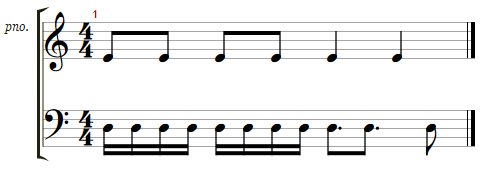
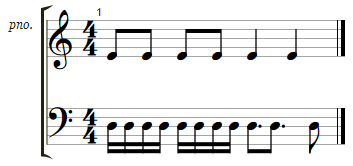
* The stretch force is a setting that controls the spacing of the music notation. AlphaTab uses a varaint of the Gourlay algorithm for spacing which has springs and rods for
* aligning elements. This setting controls the "strength" of the springs. The stronger the springs, the wider the spacing.
*
* | Force 1 | Force 0.5 |
* |--------------------------------------------------------------|-------------------------------------------------------|
* |  |  |
*/
public stretchForce: number = 1.0;
/**
* The layouting mode used to arrange the the notation.
* @remarks
* AlphaTab has various layout engines that arrange the rendered bars differently. This setting controls which layout mode is used.
*
* @since 0.9.6
* @category Display
* @defaultValue `LayoutMode.Page`
*/
public layoutMode: LayoutMode = LayoutMode.Page;
/**
* The stave profile defining which staves are shown for the music sheet.
* @since 0.9.6
* @category Display
* @defaultValue `StaveProfile.Default`
* @remarks
* AlphaTab has various stave profiles that define which staves will be shown in for the rendered tracks. Its recommended
* to keep this on {@link StaveProfile.Default} and rather rely on the options available ob {@link Staff} level
* @deprecated Set the notation visibility by modifying the {@link Staff} properties.
*/
public staveProfile: StaveProfile = StaveProfile.Default;
/**
* Limit the displayed bars per system (row). (-1 for automatic mode)
* @since 0.9.6
* @category Display
* @defaultValue `-1`
* @remarks
* This setting sets the number of bars that should be put into one row during layouting. This setting is only respected
* when using the {@link LayoutMode.Page} where bars are aligned in systems. [Demo](https://alphatab.net/docs/showcase/layouts#page-layout-5-bars-per-row).
*/
public barsPerRow: number = -1;
/**
* The bar start index to start layouting with.
* @since 0.9.6
* @category Display
* @defaultValue `1`
* @remarks
* This setting sets the index of the first bar that should be rendered from the overall song. This setting can be used to
* achieve a paging system or to only show partial bars of the same file. By this a tutorial alike display can be achieved
* that explains various parts of the song. Please note that this is the bar number as shown in the music sheet (1-based) not the array index (0-based).
* [Demo](https://alphatab.net/docs/showcase/layouts#page-layout-bar-5-to-8)
*/
public startBar: number = 1;
/**
* The total number of bars that should be rendered from the song. (-1 for all bars)
* @since 0.9.6
* @category Display
* @defaultValue `-1`
* @remarks
* This setting sets the number of bars that should be rendered from the overall song. This setting can be used to
* achieve a paging system or to only show partial bars of the same file. By this a tutorial alike display can be achieved
* that explains various parts of the song. [Demo](https://alphatab.net/docs/showcase/layouts)
*/
public barCount: number = -1;
/**
* The number of bars that should be placed within one partial render.
* @since 0.9.6
* @category Display
* @defaultValue `10`
* @remarks
* AlphaTab renders the whole music sheet in smaller chunks named "partials". This is to reduce the risk of
* encountering browser performance restrictions and it gives faster visual feedback to the user. This
* setting controls how many bars are placed within such a partial.
*/
public barCountPerPartial: number = 10;
/**
* Whether to justify also the last system in page layouts.
* @remarks
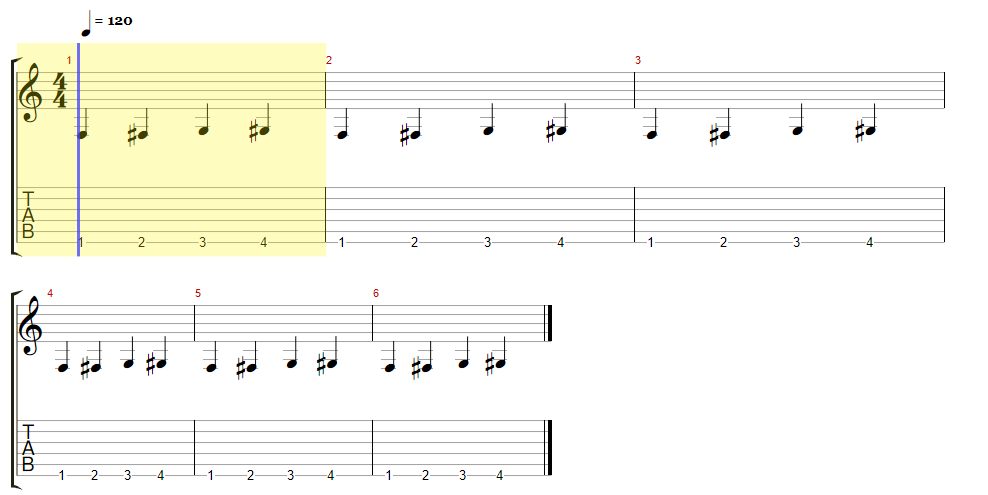
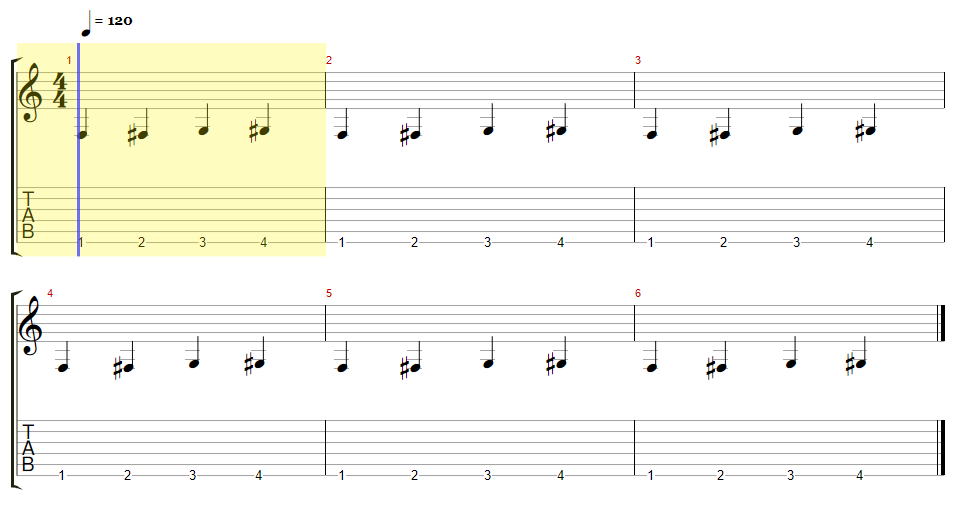
* Setting this option to `true` tells alphaTab to also justify the last system (row) like it
* already does for the systems which are full.
* | Justification Disabled | Justification Enabled |
* |--------------------------------------------------------------|-------------------------------------------------------|
* |  |  |
* @since 1.3.0
* @category Display
* @defaultValue `false`
*/
public justifyLastSystem: boolean = false;
/**
* Allows adjusting of the used fonts and colors for rendering.
* @json_partial_names
* @since 0.9.6
* @category Display
* @defaultValue `false`
* @domWildcard
* @remarks
* AlphaTab allows configuring the colors and fonts used for rendering via the rendering resources settings. Please note that as of today
* this is the primary way of changing the way how alphaTab styles elements. CSS styling in the browser cannot be guaranteed to work due to its flexibility.
*
*
* Due to space reasons in the following table the common prefix of the settings are removed. Please refer to these examples to eliminate confusion on the usage:
*
* | Platform | Prefix | Example Usage |
* |------------|---------------------------|--------------------------------------------------------------------|
* | JavaScript | `display.resources.` | `settings.display.resources.wordsFont = ...` |
* | JSON | `display.resources.` | `var settings = { display: { resources: { wordsFonts: '...'} } };` |
* | JSON | `resources.` | `var settings = { resources: { wordsFonts: '...'} };` |
* | .net | `Display.Resources.` | `settings.Display.Resources.WordsFonts = ...` |
* | Android | `display.resources.` | `settings.display.resources.wordsFonts = ...` |
* ## Types
*
* ### Fonts
*
* For the JavaScript platform any font that might be installed on the client machines can be used.
* Any additional fonts can be added via WebFonts. The rendering of the score will be delayed until it is detected that the font was loaded.
* Simply use any CSS font property compliant string as configuration. Relative font sizes with percentual values are not supported, remaining values will be considered if supported.
*
* {@since 1.2.3} Multiple fonts are also supported for the Web version. alphaTab will check if any of the fonts in the list is loaded instead of all. If none is available at the time alphaTab is initialized, it will try to initiate the load of the specified fonts individual through the Browser Font APIs.
*
* For the .net platform any installed font on the system can be used. Simply construct the `Font` object to configure your desired fonts.
*
* ### Colors
*
* For JavaScript you can use any CSS font property compliant string. (#RGB, #RGBA, #RRGGBB, #RRGGBBAA, rgb(r,g,b), rgba(r,g,b,a) )
*
* On .net simply construct the `Color` object to configure your desired color.
*/
public resources: RenderingResources = new RenderingResources();
/**
* Adjusts the padding between the music notation and the border.
* @remarks
* Adjusts the padding between the music notation and the outer border of the container element.
* The array is either:
* * 2 elements: `[left-right, top-bottom]`
* * 4 elements: ``[left, top, right, bottom]``
* @since 0.9.6
* @category Display
* @defaultValue `[35, 35]`
*/
public padding: number[] = [35, 35];
// system paddings
/**
* The top padding applied to first system.
* @since 1.4.0
* @category Display
* @defaultValue `0`
*/
public firstSystemPaddingTop: number = 0;
/**
* The top padding applied systems beside the first one.
* @since 1.4.0
* @category Display
* @defaultValue `10`
*/
public systemPaddingTop: number = 10;
/**
* The bottom padding applied to systems beside the last one.
* @since 1.4.0
* @category Display
* @defaultValue `10`
*/
public systemPaddingBottom: number = 10;
/**
* The bottom padding applied to the last system.
* @since 1.4.0
* @category Display
* @defaultValue `5`
*/
public lastSystemPaddingBottom: number = 5;
/**
* The padding left to the track name label of the system.
* @since 1.4.0
* @category Display
* @defaultValue `0`
*/
public systemLabelPaddingLeft: number = 0;
/**
* The padding left to the track name label of the system.
* @since 1.4.0
* @category Display
* @defaultValue `3`
*/
public systemLabelPaddingRight: number = 3;
/**
* The padding between the accolade bar and the start of the bar itself.
* @since 1.4.0
* @category Display
* @defaultValue `3`
*/
public accoladeBarPaddingRight: number = 3;
// Staff padding
/**
* The top padding applied to the first main notation staff (standard, tabs, numbered, slash).
* @since 1.8.0
* @category Display
* @defaultValue `0`
*/
public firstNotationStaffPaddingTop: number = 0;
/**
* The bottom padding applied to last main notation staff (standard, tabs, numbered, slash).
* @since 1.8.0
* @category Display
* @defaultValue `0`
*/
public lastNotationStaffPaddingBottom: number = 0;
/**
* The top padding applied to main notation staves (standard, tabs, numbered, slash).
* @since 1.4.0
* @category Display
* @defaultValue `0`
*/
public notationStaffPaddingTop: number = 0;
/**
* The bottom padding applied to main notation staves (standard, tabs, numbered, slash).
* @since 1.4.0
* @category Display
* @defaultValue `0`
*/
public notationStaffPaddingBottom: number = 0;
/**
* The top padding applied to effect annotation staffs.
* @since 1.4.0
* @category Display
* @defaultValue `0`
* @deprecated Effect staves do not exist anymore, effects are now part of the main notation staves. This value has no effect anymore.
* Use {@link effectBandPaddingBottom} to control the padding after effect bands.
*/
public effectStaffPaddingTop: number = 0;
/**
* The bottom padding applied to effect annotation staffs.
* @since 1.4.0
* @category Display
* @defaultValue `0`
* @deprecated Effect staves do not exist anymore, effects are now part of the main notation staves. This value has no effect anymore.
* Use {@link effectBandPaddingBottom} to control the padding after effect bands.
*/
public effectStaffPaddingBottom: number = 0;
/**
* The left padding applied between the left line and the first glyph in the first staff in a system.
* @since 1.4.0
* @category Display
* @defaultValue `6`
*/
public firstStaffPaddingLeft: number = 6;
/**
* The left padding applied between the left line and the first glyph in the following staff in a system.
* @since 1.4.0
* @category Display
* @defaultValue `2`
*/
public staffPaddingLeft: number = 2;
/**
* The padding between individual effect bands.
* @since 1.7.0
* @category Display
* @defaultValue `2`
*/
public effectBandPaddingBottom = 2;
/**
* The additional padding to apply between the staves of two separate tracks.
* @since 1.8.0
* @category Display
* @defaultValue `5`
*/
public trackStaffPaddingBetween = 5;
/**
* The additional padding to apply between multiple lyric lines.
* @since 1.8.0
* @category Display
* @defaultValue `5`
*/
public lyricLinesPaddingBetween = 5;
/**
* The mode used to arrange staves and systems.
* @since 1.3.0
* @category Display
* @defaultValue `1`
* @remarks
* By default alphaTab uses an own (automatic) mode to arrange and scale the bars when
* putting them into staves. This property allows changing this mode to change the music sheet arrangement.
*
* ## Supported File Formats:
* * Guitar Pro 6-8 {@since 1.3.0}
* If you want/need support for more file formats to respect the sizing information feel free to [open a discussion](https://github.com/CoderLine/alphaTab/discussions/new?category=ideas) on GitHub.
*
* ## Automatic Mode
*
* In the automatic mode alphaTab arranges the bars and staves using its internal mechanisms.
*
* For the `page` layout this means it will scale the bars according to the `stretchForce` and available width.
* Wrapping into new systems (rows) will happen when the row is considered "full".
*
* For the `horizontal` layout the `stretchForce` defines the sizing and no wrapping happens at all.
*
* ## Model Layout mode
*
* File formats like Guitar Pro embed information about the layout in the file and alphaTab can read and use this information.
* When this mode is enabled, alphaTab will also actively use this information and try to respect it.
*
* alphaTab holds following information in the data model and developers can change those values (e.g. by tapping into the `scoreLoaded`) event.
*
* **Used when single tracks are rendered:**
*
* * `score.tracks[index].systemsLayout` - An array of numbers describing how many bars should be placed within each system (row).
* * `score.tracks[index].defaultSystemsLayout` - The number of bars to place in a system (row) when no value is defined in the `systemsLayout`.
* * `score.tracks[index].staves[index].bars[index].displayScale` - The relative size of this bar in the system it is placed. Note that this is not directly a percentage value. e.g. if there are 3 bars and all define scale 1, they are sized evenly.
* * `score.tracks[index].staves[index].bars[index].displayWidth` - The absolute size of this bar when displayed.
*
* **Used when multiple tracks are rendered:**
*
* * `score.systemsLayout` - Like the `systemsLayout` on track level.
* * `score.defaultSystemsLayout` - Like the `defaultSystemsLayout` on track level.
* * `score.masterBars[index].displayScale` - Like the `displayScale` on bar level.
* * `score.masterBars[index].displayWidth` - Like the `displayWidth` on bar level.
*
* ### Page Layout
*
* The page layout uses the `systemsLayout` and `defaultSystemsLayout` to decide how many bars go into a single system (row).
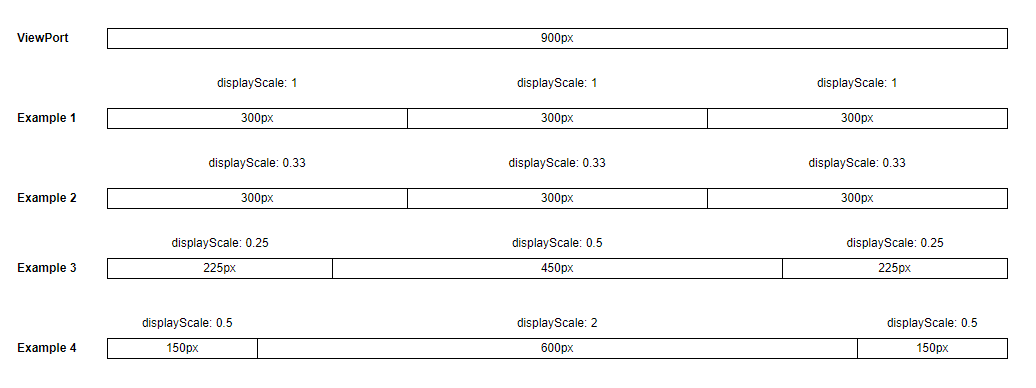
* Additionally when sizing the bars within the system the `displayScale` is used. As indicated above, the scale is rather a ratio than a percentage value but percentages work also:
*
* 
*
* The page layout does not use `displayWidth`. The use of absolute widths would break the proper alignments needed for this kind of display.
*
* In both modes, prefix and postfix glyphs (clef, key signature, time signature, barlines) are treated as fixed overhead: they keep their
* natural size and the remaining staff width is distributed across bars by a per-bar weight. This matches the convention used by
* Guitar Pro, Dorico, Finale, Sibelius and MuseScore. Bars that carry a system-start prefix or a mid-line clef/key/time-signature change
* are therefore visibly wider than plain bars with the same weight. The weight source depends on the mode:
*
* * `Automatic` (default for `page` layout): weights come from the built-in spacing engine (the natural content width of each bar).
* `displayScale` on the model is ignored.
* * `UseModelLayout` (and the `parchment` layout): weights come from `bar.displayScale` / `masterBar.displayScale`. An unset
* `displayScale` defaults to `1` and behaves identically to an explicit `1`, matching Guitar Pro (which omits the value when the
* author hasn't customized it).
*
* ### Horizontal Layout
*
* The horizontal layout uses the `displayWidth` to scale the bars to size the bars exactly as specified. This kind of sizing and layout can be useful for usecases like:
*
* * Comparing files against each other (top/bottom comparison)
* * Aligning the playback of multiple files on one screen assuming the same tempo (e.g. one file per track).
* @deprecated Use the {@link LayoutMode.Parchment} to display a music sheet respecting the systems layout.
*/
public systemsLayoutMode: SystemsLayoutMode = SystemsLayoutMode.Automatic;
}