| name | write-swarm-client |
|---|---|
| description | Create a trainable agent loop or agent workflow with AgentJet |
| license | Complete terms in LICENSE.txt |
Your task is to create a trainable Agent (or Agent Loop, multi-agent system, etc.) based on the requirements, and provide it to the user for reinforcement learning training. Under the AgentJet reinforcement learning framework, this is very simple.
First, give the agent system a name based on the user's requirements, always place your code at ``tutorial/opencode_build_*, for example opencode_build_math_agent`.
Next, create the directory:
tutorial/opencode_build_math_agent
Then, create the Agent source files:
tutorial/opencode_build_math_agent/agent_roll.py(Usetutorial/example_academic_trans_swarm/trans_roll.pyas a template. There aren't many changes — the key is to ask the user for the necessary parameters.)tutorial/opencode_build_math_agent/agent_run.py(Create the function or class to run the agent based on the user's requirements. Synchronous or asynchronous are both fine.)tutorial/opencode_build_math_agent/readme.md(Agent description, along with training and debugging instructions.)
Write the agent using the OpenAI SDK. It mainly includes the following three functions (along with any necessary sub-functions and sub-modules):
from ajet.schema.task import Task, WorkflowOutput

def _compute_reward(...)

def _execute_agent(...)

def run_agent_and_compute_reward(task: Task, base_url: string, api_key: string) -> WorkflowOutput:
In agent_roll, simply import run_agent_and_compute_reward.
- Key points for writing the agent: Efficiently complete the user's given task through the collaboration of one or several Agents.
- Key points for writing the reward: For things that are easy to verify, calculate directly using rules. For things that are hard to verify, follow the approach in
tutorial/example_academic_trans_swarm/train_multi_model/trans_reward.pyand use other large models to create an LLM-as-Judge program.
Overall, the user first runs ajet-swarm start, then runs agent_roll.py, and training begins. You do not need to and are not allowed to run these bash commands.
- First, help the user write
agent_run.pyandagent_roll.py. - Then, write clear instructions to guide the user through training (
readme.md).
Your task is then complete.
Below are some reference materials.
Your task is to create a trainable Agent (or Agent Loop, multi-agent system, etc.) based on the requirements, and provide it to the user for reinforcement learning training. Under the AgentJet reinforcement learning framework, this is very simple.
First, give the agent system a name based on the user's requirements, for example opencode_build_math_agent.
Next, create the directory:
tutorial/opencode_build_math_agent
Then, create the Agent source files:
tutorial/opencode_build_math_agent/agent_roll.py(Usetutorial/example_academic_trans_swarm/trans_roll.pyas a template. There aren't many changes — the key is to ask the user for the necessary parameters.)tutorial/opencode_build_math_agent/agent_run.py(Create the function or class to run the agent based on the user's requirements. Synchronous or asynchronous are both fine.)tutorial/opencode_build_math_agent/readme.md(Agent description, along with training and debugging instructions.)
Write the agent using the OpenAI SDK. It mainly includes the following three functions (along with any necessary sub-functions and sub-modules):
from ajet.schema.task import Task, WorkflowOutput

def _compute_reward(...)

def _execute_agent(...)

def run_agent_and_compute_reward(task: Task, base_url: string, api_key: string) -> WorkflowOutput:
In agent_roll, simply import run_agent_and_compute_reward.
- Key points for writing the agent: Efficiently complete the user's given task through the collaboration of one or several Agents.
- Key points for writing the reward: For things that are easy to verify, calculate directly using rules. For things that are hard to verify, follow the approach in
tutorial/example_academic_trans_swarm/train_multi_model/trans_reward.pyand use other large models to create an LLM-as-Judge program.
Overall, the user first runs ajet-swarm start, then runs agent_roll.py, and training begins. You do not need to and are not allowed to run these bash commands.
- First, help the user write
agent_run.pyandagent_roll.py. - Then, write clear instructions to guide the user through training (
readme.md).
Your task is then complete.
Below are some reference materials. ---
# Using AgentJet Swarm to Train Your Agents
AgentJet Swarm opens infinite possibilities for both LLM Agent engineers and LLM researchers. It is very easy to use and understand. In fact, there is no need for verbose explaination, code explains itself:
## (1/2) Launching a Swarm Server ("aircraft carrier")
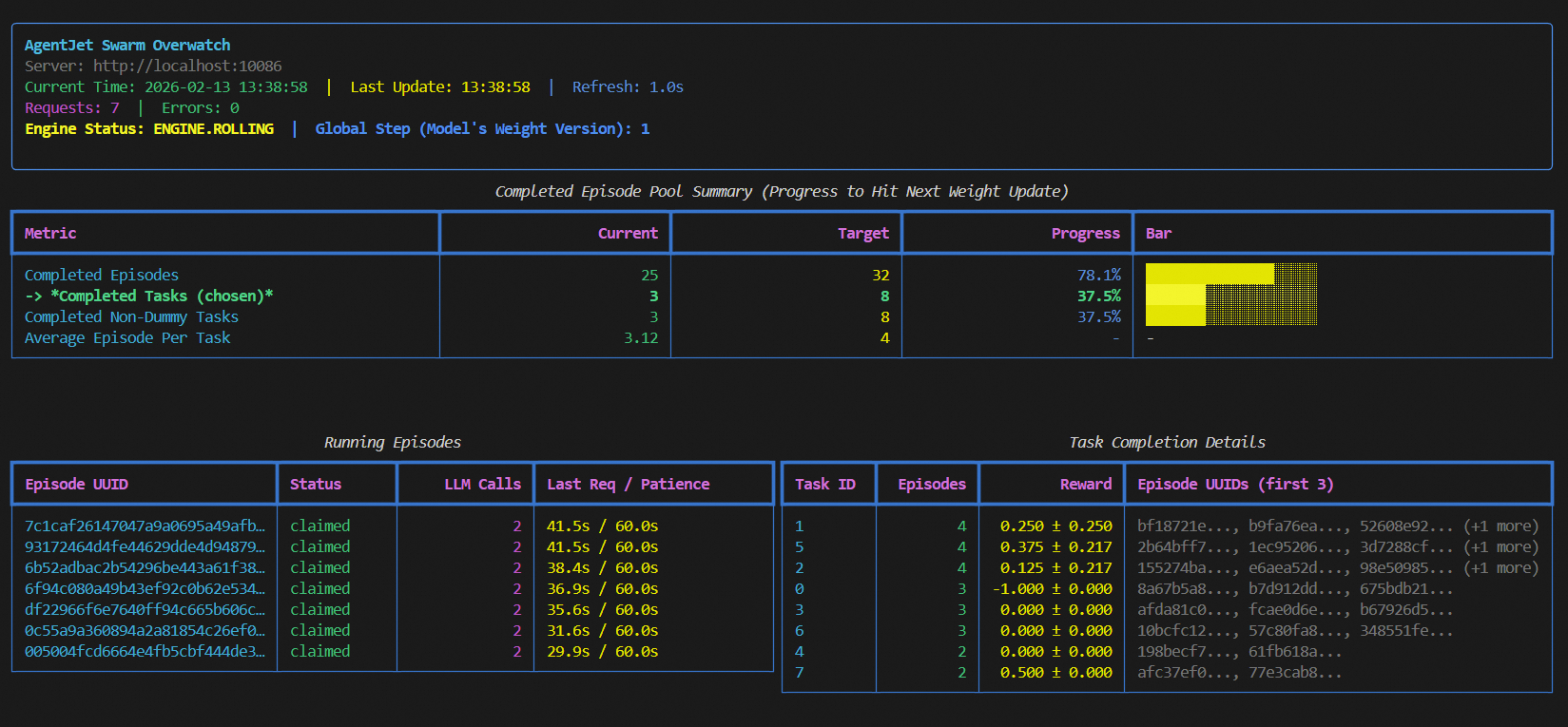
Simply run `ajet-swarm start` on a GPU server (or GPU cluster master), and we are done ✅. (You may ask: what about training config? Well, config will come from swarm client.)
Notes:
1. launch server together with a swarm monitor:
```bash
(ajet-swarm start &> ajet-swarm-server.log) & (ajet-swarm overwatch)
```
2. overwatch swarm status with url:
```bash
ajet-swarm overwatch --swarm-url=http://localhost:10086
```
3. changing customized port (default port is 10086):
```bash
ajet-swarm start --swarm-port=10086
```
4. if you are using a multi-node cluster to train huge models, make sure you have already set up the ray cluster before you hit `ajet-swarm start`.
## (2/2) Launching Swarm Clients ("jets")
You can run any amount of swarm client:
- on any devices (macbook, workstation, the same machine you run swarm-server, **wherever you want**).
- at any time (before or in the middle of a training, **whenever you want**)
But just remember: **ALL** swarm clients are equally authorized to order swarm server(s) **start or terminate** the training process. There is **no such role like Queen** in AgentJet Swarm.
### 2-1. Connecting to a swarm server and make it rock&roll
The primary objective of swarm client is to make sure network connection is good.
Now, create a python script and start coding:
```python
from ajet.tuner_lib.experimental.swarm_client import SwarmClient
REMOTE_SWARM_URL = "http://localhost:10086" # Change to your swarm remote url
swarm_worker = SwarmClient(REMOTE_SWARM_URL)
```
Secondly, generate a configuration (basically VERL yaml, but slightly different), **connect** to swarm server and then tell the swarm server **which model to train**, etc. When configuration is ready, tell engine to read yaml and begin VERL training cycles with `auto_sync_train_config_and_start_engine`.
```python
LOCAL_GRPO_N = 32
yaml_job = AgentJetJob(
experiment_name="math_gsm8k_grpo",
algorithm="grpo",
n_gpu=4,
model='/mnt/data_cpfs/model_cache/modelscope/hub/Qwen/Qwen/Qwen2.5-3B-Instruct',
batch_size=LOCAL_GRPO_N,
num_repeat=4,
)
# hint: you can `yaml_job.dump_job_as_yaml('./config.yaml')` to take a look at the full configuration
# hint: you can `yaml_job.build_job_from_yaml('./config.yaml')` to load yaml configuration as override. (there are some configurations that must be edited from yaml)
swarm_worker.auto_sync_train_config_and_start_engine(yaml_job)
```
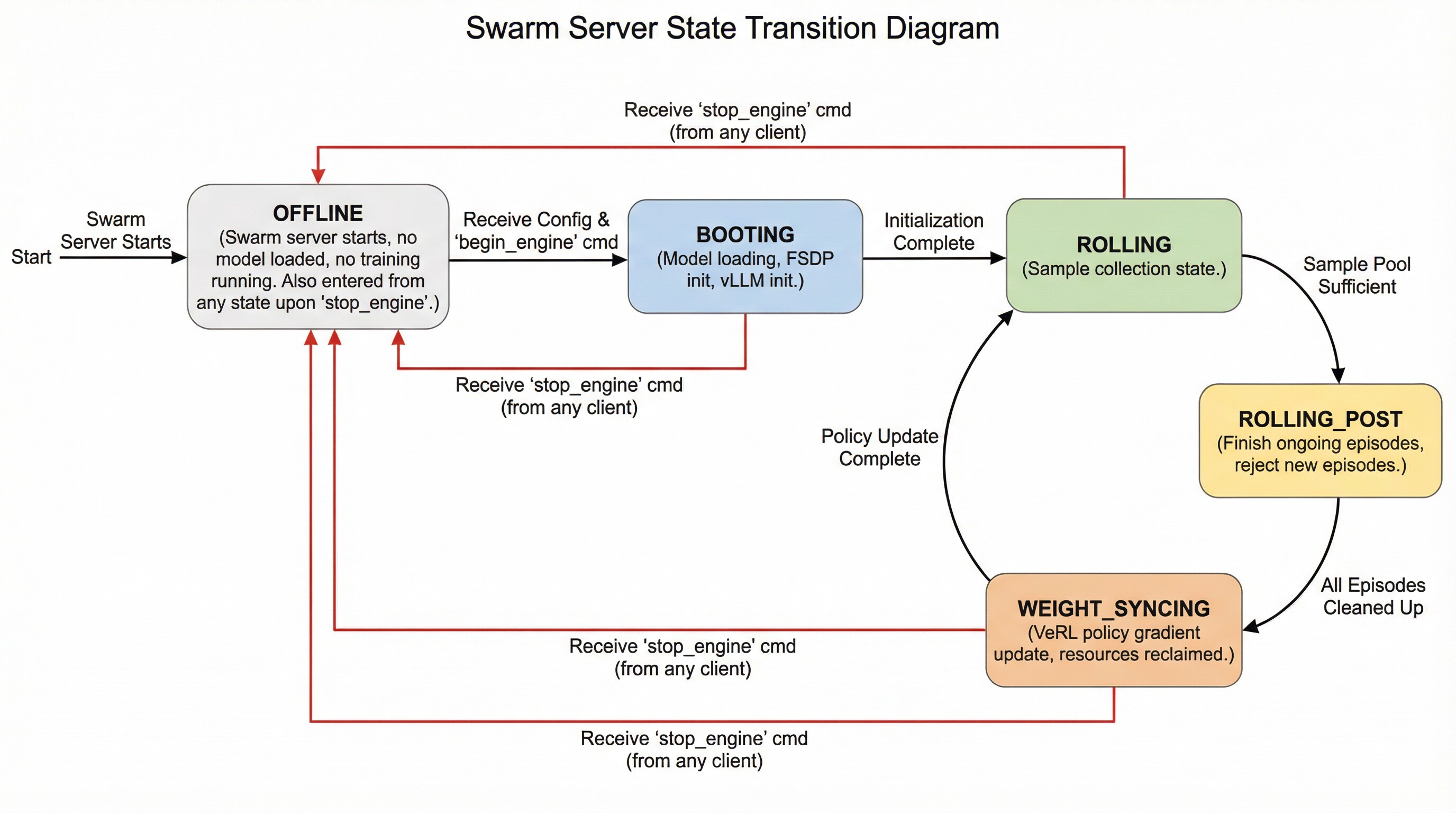
The swarm server can be in the following states and transition between them as follows:
- **OFFLINE**: The swarm server is started but does not load any models or perform any training. It enters this state directly after startup. Additionally, it transitions to this state upon receiving a `stop_engine` command from (any) client while in any other state.
- **BOOTING**: The swarm server enters this state upon receiving a configuration followed by an explicit `begin_engine` command. In this state, it loads model parameters, initializes FSDP, and initializes vLLM.
- **ROLLING**: The swarm server enters this state automatically after completing **BOOTING** or after finishing the **WEIGHT_SYNCING** state. This represents the sampling phase.
- **ROLLING_POST**: When the swarm server determines that the sample pool is sufficient for proceeding to the next policy gradient step, it automatically transitions to this state. While in this state, ongoing episodes can still complete normally, but no new episodes can begin.
- **WEIGHT_SYNCING**: After being in the **ROLLING_POST** state, once all computational resources and threads related to ongoing episodes are reclaimed and cleaned up, the swarm server transitions to this state. During this stage, VERL completes the current policy gradient strategy update and then returns to the **ROLLING** state, repeating the cycle.
### 2-2. Read your dataset and create training epoch loop
```python
LOCAL_DATASET_PATH = "/mnt/data_cpfs/dataset/openai/gsm8k/main"
dataset = RouterTaskReader(
reader_type = "huggingface_dat_repo",
reader_config = AjetTaskReader(
huggingface_dat_repo = HuggingfaceDatRepo(
dataset_path = LOCAL_DATASET_PATH
)
)
)
for epoch in range(LOCAL_NUM_EPOCH):
for _, task in enumerate(dataset.generate_training_tasks()):
for _ in range(LOCAL_GRPO_N):
print(task)
# executor.submit(rollout, task) # this is the place to begin a agent workflow / agent loop, we come back here later
```
You may ask: when does the policy gradient & llm weight update take place?
The answer is simple: **the swarm server takes care of everything related to training, while the swarm clients do not need to worry about this process at all**.
By default, when enough amount (>=batch size) of samples (with reward) reach the swarm server, that when a llm weight update step begins.
Please run `ajet-swarm overwatch` during training, this panel displays everything about the weight update timing, transparently.
When opening this panel, you can see 3 modes which you can select from: "rollout_until_finish_enough_episodes"(only count episodes), "rollout_until_finish_enough_tasks" (+consider task group), "rollout_until_finish_enough_non_dummy_tasks" (+consider group reward)
Another important thing to notice: each task must have a valid task_id (str), which is used to:
- Group up epsiodes that belong to same task inside swarm server (you do not have to worry about that).
- Used as a random seed if the task is a game requires random initialization. (e.g. werewolves game's player identity)
### 2-3. Intergrate with your agent loop.
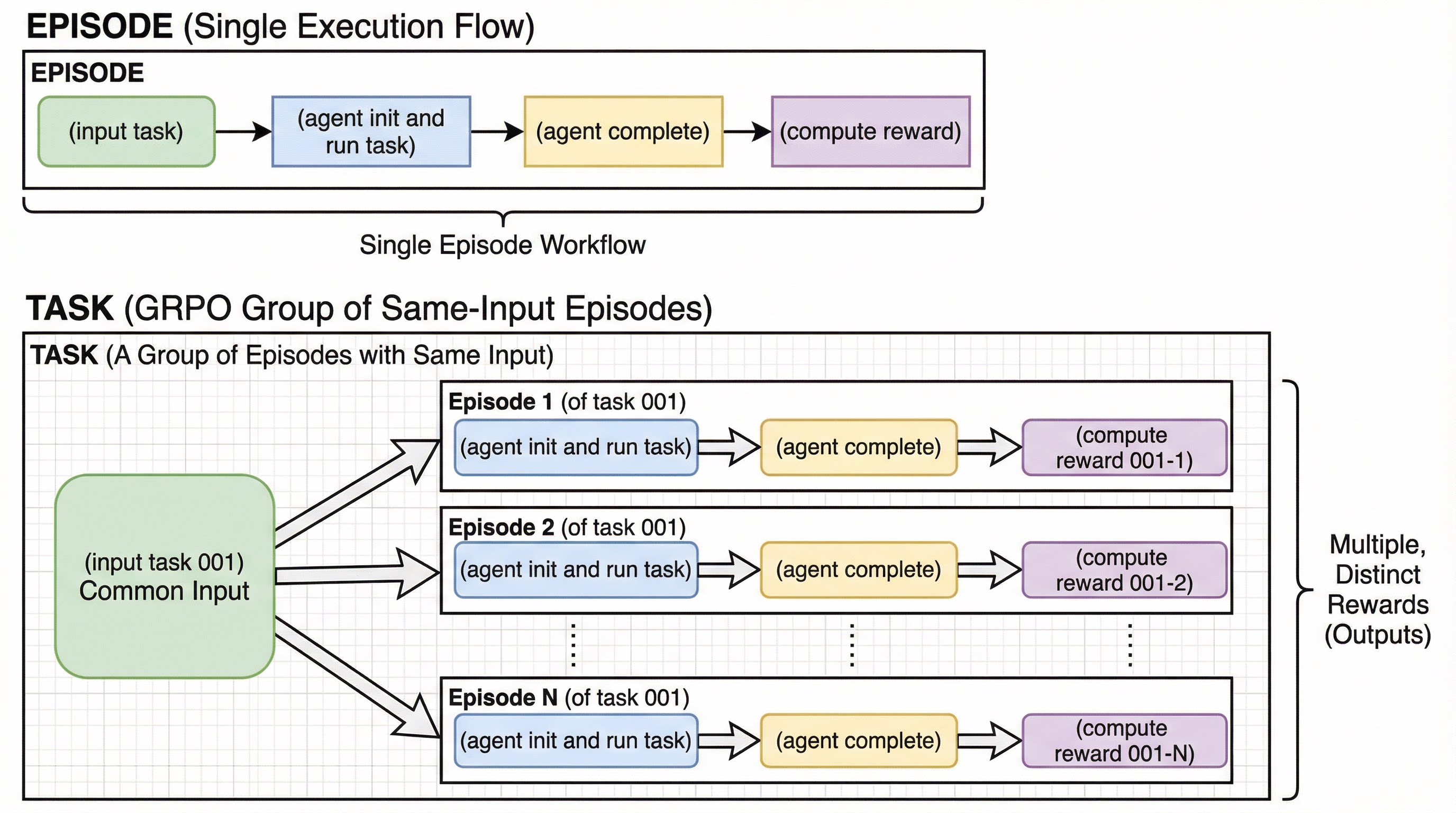
Before intergrating your agent loop, we need to explain two concepts: **Episode** and **Task Group**.
The following process is called an "**Episode**":
*<br/>
(input task) -> (agent init and run task) -> (agent complete) -> (compute reward)
<br/>*
And in comparison, we call a group of same-input episodes a **Task Group**:
*(input task 001) -> (agent init and run task) -> (agent complete) -> (compute reward 001-1)
<br/>
(input task 001) -> (agent init and run task) -> (agent complete) -> (compute reward 001-2)
<br/>
..............................
<br/>
(input task 001) -> (agent init and run task) -> (agent complete) -> (compute reward 001-N)*
With these two concepts in mind, we can write our training program (yes, this is training, NOT just inference):
```python
def rollout(task):
try:
# begin episode
episode_uuid, api_baseurl_key = swarm_worker.begin_episode()
# execute agent ( base_url = api_baseurl_key.base_url, api_key = api_baseurl_key.api_key )
workflow_output = execute_you_agent_here(task, api_baseurl_key) # reward is in `workflow_output`
# report output back to swarm remote
swarm_worker.end_episode(task, episode_uuid, workflow_output)
return
except:
pass
executor = BoundedThreadPoolExecutor(max_workers=LOCAL_MAX_PARALLEL)
for epoch in range(1024):
# loop dataset epoch
for _, task in enumerate(dataset.generate_training_tasks()):
# loop dataset tasks
for _ in range(LOCAL_GRPO_N):
# loop episode
executor.submit(rollout, task)
swarm_worker.stop_engine()
```
Explaination:
1. each agent workflow (each episode) must be started with `swarm_worker.begin_episode`,
which take vLLM/SGLang computational resource from swarm server, and returns `api_baseurl_key`.
2. take `base_url = api_baseurl_key.base_url` and `api_key = api_baseurl_key.api_key`, run your agent, compute reward, and return `workflow_output` to wrap the computed reward.
3. call `end_episode` to report reward to swarm server. (or alternatively call `abort_episode` to give up this episode, hoping to rollout something else in next try)
4. the whole `swarm_worker` thing is thread safe, go threading any way as you wish.
5. you can kill this script in the middle from the training, move it to another computer(s), and resume training without losing any progress.
6. you can **debug during training**, this is a crazy but very useful feature. Just change `end_episode` to `abort_episode` and remove `stop_engine`, and then you can copy the modified script to wherevery you want, and debug however you wish.
In this demo, we choose a simple gsm8k RL task.

### (D1-1) Sync and Bring Swarm Server Online

- Tell swarm server which model you train, and what are your training hyper-parameters.
- Tell swarm server to bring itself online.

```python
swarm_worker = SwarmClient("http://localhost:10086")
yaml_job = AgentJetJob(
    algorithm="grpo",
    project_name="ajet-swarm",
    experiment_name="test",
    n_gpu=REMOTE_ALLOCATE_GPU_PER_NODE,
    model=REMOTE_TRAIN_MODEL_01,
    batch_size=REMOTE_BATCH_SIZE,
    num_repeat=LOCAL_GRPO_N,
)

swarm_worker.sync_train_config(yaml_job)
swarm_worker.start_engine()
# or simply `swarm_worker.auto_sync_train_config_and_start_engine(yaml_job)` to do two thing in one shot.
```

Hints:
- You can `yaml_job.dump_job_as_yaml('./config.yaml')` to take a look at the full configuration.
- You can `yaml_job.build_job_from_yaml('./config.yaml')` to load yaml configuration as override. (there are some configurations that must be edited from yaml).

### (D1-2) Write your agent & reward

Write customized agents and reward functions, using sync / async function, the choice is yours.

```python
def execute_agent(task: Task, api_baseurl_key: OpenaiBaseUrlAndApiKey):
    # Prepare base_url, api_key
    base_url, api_key = (api_baseurl_key.base_url, api_baseurl_key.api_key)
    # Read dataset item
    query, reference_answer = (task.main_query, task.metadata["answer"])
    # Prepare messages
    messages = [
        { "role": "system", "content": dedent("""You are an agent specialized in solving math problems. Please solve the math problem given to you.
        You can write and execute Python code to perform calculation or verify your answer. You should return your final answer within \\boxed{{}}.""") },
        { "role": "user", "content": query }
    ]
    # Use raw http requests (non-streaming) to get response
    response = requests.post( f"{base_url}/chat/completions", json = { "model": "fill_whatever_model", "messages": messages, },
                            headers = { "Authorization": f"Bearer {api_key}" } )
    final_answer = response.json()['choices'][0]['message']['content']

    reference_answer = reference_answer.split("####")[-1].strip()
    pattern = r"\\boxed\{([^}]*)\}"
    match = re.search(pattern, final_answer)
    if match: is_success = match.group(1) == reference_answer
    else: is_success = False
    raw_reward = 1.0 if is_success else 0.0
    # Return
    return WorkflowOutput(reward=raw_reward, metadata={"final_answer": final_answer})

def rollout(task) -> float | None:
    # begin episode
    episode_uuid, api_baseurl_key = swarm_worker.begin_episode()
    # execute agent ( base_url = api_baseurl_key.base_url, api_key = api_baseurl_key.api_key )
    workflow_output = execute_agent(task, api_baseurl_key)  # reward is in `workflow_output`
    # report output back to swarm remote
    swarm_worker.end_episode(task, episode_uuid, workflow_output)
    return workflow_output.reward
```

One important thing to note is that before each episode begins, you need to call `begin_episode` to obtain the `base_url` and `api_key`. At the same time, you will receive an episode identifier, `episode_uuid`. The `swarm_worker` is thread-safe and does not hold the state of the `episode`, so you can safely invoke multiple `begin_episode` calls concurrently. When your agent finishes running, remember to call `end_episode` to send the reward signal back to the swarm server (with the `episode_uuid` parameter). Additionally, if you wish to discard an episode for reasons such as:
- **Reward miscalculation**
- **External API out of credit**
- **Debugging**
- **Evaluation testing**
- **Mid-training, checking the training results with a test case**
- **An unexpected issue arises and this episode needs to be filtered**
it’s simple: just replace `end_episode` with `abort_episode`.


### (D1-3) Begin training

Training is as simple as this:

```python
next_batch = []
for _ in range(LOCAL_NUM_EPOCHN):
    for _, task in enumerate(dataset.generate_training_tasks()):
        for _ in range(LOCAL_GRPO_N):
            next_batch.append(task)
            if len(next_batch) >= (REMOTE_BATCH_SIZE * LOCAL_GRPO_N):
                episode_results = run_episodes_until_all_complete(next_batch, func=rollout, auto_retry=True)
                print(episode_results)
                next_batch.clear()
```

You may find it hard to belive this code is a training cycle at first, but this is how simple things can become in AgentJet.

Just run your agents again and again in a loop, batch after batch, swarm server will take care of everything else.

Hint: you do not have to use `run_episodes_until_all_complete`, you are free to (let AI help you) design your own threading control logic.

### (D1-4) Full code

```python
from ajet.copilot.job import AgentJetJob
from ajet.tuner_lib.experimental.swarm_client import SwarmClient, run_episodes_until_all_complete
from ajet.default_config.ajet_default import AjetTaskReader, HuggingfaceDatRepo
from ajet.task_reader import RouterTaskReader
from tutorial.example_academic_trans_swarm.trans import execute_agent


LOCAL_GRPO_N = 4  # grpo num_repeat (rollout.n)
LOCAL_NUM_EPOCH = 10000
LOCAL_DATASET_PATH = "/mnt/data_cpfs/qingxu.fu/dataset/openai/gsm8k/main"
REMOTE_SWARM_URL = "http://localhost:10086"
REMOTE_BATCH_SIZE = 32
REMOTE_ALLOCATE_GPU_PER_NODE = 8
REMOTE_TRAIN_MODEL_01 = '/mnt/data_cpfs/model_cache/modelscope/hub/Qwen/Qwen/Qwen2.5-7B-Instruct'


def main():

    # Handshake with swarm remote, then send training param to swarm remote (such as model to be trained, algorithm, etc)
    dataset = RouterTaskReader(
        reader_type = "huggingface_dat_repo",
        reader_config = AjetTaskReader(
            huggingface_dat_repo = HuggingfaceDatRepo(
                dataset_path = LOCAL_DATASET_PATH
            )
        )
    )

    # Hand shake with remote swarm server
    swarm_worker = SwarmClient(REMOTE_SWARM_URL)
    swarm_worker.auto_sync_train_config_and_start_engine(
        AgentJetJob(
            algorithm="grpo",
            project_name="ajet-swarm",
            experiment_name="test",
            n_gpu=REMOTE_ALLOCATE_GPU_PER_NODE,
            model=REMOTE_TRAIN_MODEL_01,
            batch_size=REMOTE_BATCH_SIZE,
            num_repeat=LOCAL_GRPO_N,
        )
    )

    def rollout(task) -> float | None:
        # begin episode
        episode_uuid, api_baseurl_key = swarm_worker.begin_episode()
        # execute agent ( base_url = api_baseurl_key.base_url, api_key = api_baseurl_key.api_key )
        workflow_output = execute_agent(task, api_baseurl_key)  # reward is in `workflow_output`
        # report output back to swarm remote
        swarm_worker.end_episode(task, episode_uuid, workflow_output)
        # print global rollout status across the swarm
        swarm_worker.print_rollout_stat()
        return workflow_output.reward

    next_batch = []
    for _, task in enumerate(dataset.generate_training_tasks()):
        for _ in range(LOCAL_GRPO_N):
            next_batch.append(task)
            if len(next_batch) >= (REMOTE_BATCH_SIZE * LOCAL_GRPO_N):
                episode_results = run_episodes_until_all_complete(next_batch, func=rollout, auto_retry=True)
                print(episode_results)
                next_batch.clear()
    return None


if __name__ == "__main__":
    main()

```
We use a multi-agent translation flow to demonstrate how to train
a multi-agent RL task that is participanted by Qwen-14B and Qwen-7B simutainously.

### (D2-1) Deploy swarm server

- On GPU server 1 (example IP 22.16.208.79), run
```bash
ajet-swarm start --swarm-port=10086  # For 7B model
```

- On GPU server 2 (example IP 22.14.56.6), run
```bash
ajet-swarm start --swarm-port=10086  # For 14B model
```


### (D2-2) Write Agentic Workflow

We only take important part for simplicity (`_7b` means using Qwen-7B model, and `_14b` means using Qwen-14B model):

```python
def execute_agent(task, api_baseurl_key_7b, api_baseurl_key_14b):
    """
    Execute the multi-model academic translation workflow.

    Agent 1 (rough translation): 7B model
    Agent 2 (detect proper nouns): 14B model
    Agent 3 (final translation): 7B model

    Returns:
        tuple: (workflow_output_7b, workflow_output_14b)
            - workflow_output_7b: Reward based on final translation quality (for 7B model)
            - workflow_output_14b: Reward based on proper noun detection quality (for 14B model)
    """
    # Prepare base_url, api_key for 7B model (agents 1 and 3)
    base_url_7b, api_key_7b = (api_baseurl_key_7b.base_url, api_baseurl_key_7b.api_key)
    # Prepare base_url, api_key for 14B model (agent 2)
    base_url_14b, api_key_14b = (api_baseurl_key_14b.base_url, api_baseurl_key_14b.api_key)
    # Read dataset item
    abstract = task.metadata['abstract']
    # Agent 1: Rough translation using 7B model
    messages, rough_translate = rough_translate_agent(base_url_7b, api_key_7b, abstract)
    # Agent 2: Detect hard proper nouns using 14B model
    messages, fix_nouns = detect_hard_proper_nouns(messages, base_url_14b, api_key_14b, abstract, rough_translate)
    # Agent 3: Produce final translation using 7B model
    messages, final_translation = produce_final_translation(messages, base_url_7b, api_key_7b, abstract, rough_translate, fix_nouns)
    print_listofdict(messages, header="final_translation", mod="c")
    # Compute rewards for both models
    grader_base_url, grader_api_key = ("https://dashscope.aliyuncs.com/compatible-mode/v1", os.environ.get("DASHSCOPE_API_KEY", ""))
    grader_model = OpenAIChatModel(base_url=grader_base_url, api_key=grader_api_key, model="qwen3-max-2026-01-23")
    reward_7b = ...
    reward_14b = ...
    # Return two separate WorkflowOutputs with different rewards
    workflow_output_7b = WorkflowOutput(reward=reward_7b, metadata={
        "rough_translate": rough_translate,
        "fix_nouns": fix_nouns,
        "final_translation": final_translation,
        "model": "7B"
    })
    workflow_output_14b = WorkflowOutput(reward=reward_14b, metadata={
        "rough_translate": rough_translate,
        "fix_nouns": fix_nouns,
        "final_translation": final_translation,
        "model": "14B"
    })
    return workflow_output_7b, workflow_output_14b

```


### (D2-3) Train!

With the code below, we drive two VERL swarm server to serve for a hybrid multi-agent workfow (that requires 7B and 14B model to work hand in hand), and train together!

```python
# Hand shake with remote swarm server for 14B model (agent 2)
swarm_worker_14b = SwarmClient(REMOTE_14B_SWARM_URL)
swarm_worker_14b.auto_sync_train_config_and_start_engine(
    AgentJetJob(
        algorithm="grpo",
        project_name="ajet-swarm-academic-trans",
        experiment_name="14b-model",
        n_gpu=REMOTE_14B_ALLOCATE_GPU_PER_NODE,
        model=REMOTE_14B_TRAIN_MODEL,
        batch_size=REMOTE_14B_BATCH_SIZE,
        num_repeat=LOCAL_GRPO_N,
    )
)
# Hand shake with remote swarm server for 7B model (agents 1 and 3)
swarm_worker_7b = SwarmClient(REMOTE_7B_SWARM_URL)
swarm_worker_7b.auto_sync_train_config_and_start_engine(
    AgentJetJob(
        algorithm="grpo",
        project_name="ajet-swarm-academic-trans",
        experiment_name="7b-model",
        n_gpu=REMOTE_7B_ALLOCATE_GPU_PER_NODE,
        model=REMOTE_7B_TRAIN_MODEL,
        batch_size=REMOTE_7B_BATCH_SIZE,
        num_repeat=LOCAL_GRPO_N,
    )
)

def rollout(task):
    # Begin episode for 7B model (agents 1 and 3)
    episode_uuid_7b, api_baseurl_key_7b = swarm_worker_7b.begin_episode(discard_episode_timeout=240)
    # Begin episode for 14B model (agent 2)
    episode_uuid_14b, api_baseurl_key_14b = swarm_worker_14b.begin_episode(discard_episode_timeout=240)
    # Execute agent workflow with both models
    # Returns two separate WorkflowOutputs with different rewards
    workflow_output_7b, workflow_output_14b = execute_agent(task, api_baseurl_key_7b, api_baseurl_key_14b)
    # Report output back to swarm remotes with their respective rewards
    swarm_worker_7b.end_episode(task, episode_uuid_7b, workflow_output_7b)
    swarm_worker_14b.end_episode(task, episode_uuid_14b, workflow_output_14b)
    # Print global rollout status across the swarm
    swarm_worker_7b.print_rollout_stat()
    swarm_worker_14b.print_rollout_stat()
    # Return the average reward for logging purposes
    return (workflow_output_7b.reward + workflow_output_14b.reward) / 2.0

next_batch = []
for _, task in enumerate(dataset.generate_training_tasks()):
    for _ in range(LOCAL_GRPO_N):
        next_batch.append(task)
        if len(next_batch) >= (REMOTE_7B_BATCH_SIZE * LOCAL_GRPO_N):
            episode_results = run_episodes_until_all_complete(next_batch, func=rollout, auto_retry=True)
            print(episode_results)
            next_batch.clear()
```
Sometimes agent runtime is very nasty and fails so frequently that sometimes makes you mad and frastrated.
Do not worry, AgentJet has the perfect solution for such situation: **distributed computing**.
This means even if one swarm client node crashes, other nodes will take its place and resume training.
(In fact, even if all swarm client nodes crash, the swarm training server will not go down, instead,
it will just hault and wait client nodes to go online)

To deploy such distributed agent RL framework:

- First, deploy swarm server as usual, expose 10086 port so that other machines can reach it.

- Second, on a dozen of other machines (without GPU) run `ajet-swarm overwatch --swarm-url=http://swarm-server-ip:10086` to test connection to swarm server.

- Third, choose your favorite machine, run:
    ```python
    swarm_worker = SwarmClient("http://swarm-server-ip:10086")
    yaml_job = AgentJetJob(
        algorithm="grpo", project_name="ajet-swarm", experiment_name="test",
        n_gpu=8, model="/path/to/llm/model",
        batch_size=128, num_repeat=4,
    )
    swarm_worker.sync_train_config(yaml_job)
    swarm_worker.start_engine()
    ```
and wait for a few minites until swarm server is activated.

- Finally, write your task, agent and reward:

### (D3-1) distributed swarm client cooperation

We still use the gsm8k RL task as an example.
The only thing you should notice is wisely control the level of parallelism,
let say if you have 2 clients available:

```python
N_CLIENTS = 2
next_batch = []
for _, task in enumerate(dataset.generate_training_tasks()):
    for _ in range(LOCAL_GRPO_N):
        next_batch.append(task)
        if len(next_batch) >= (REMOTE_BATCH_SIZE // N_CLIENTS * LOCAL_GRPO_N):
            episode_results = run_episodes_until_all_complete(next_batch, func=rollout, auto_retry=True)
            print(episode_results)
            next_batch.clear()
```

Save swarm client program as script: `swarm_client_roll.py`,
and then run on all available non-GPU computer(s):
```bash
python swarm_client_roll.py
```
to start training.