Converts BMP images to (pixel) objects using SPWN. Its recommended use is for helping with creating pixel art since creating with small / scaled down objects can be very difficult in the editor. Any size BMP is supported but large ones may be very slow (I recommend no larger than about 60x60 normally but smaller if you are increasing the pixel density).
The best workaround would be split the BMP into smaller sections and join them together in the level.
Any format of BMP should also be supported however some may cause some bugs to arise.
Import the library like:
spwnbmp = import spwn_bmp

//spwnbmp.parse_bmp
//spwnbmp.bmp_to_objects
It exports two macros: parse_bmp and bmp_to_objects
| Arguments | Type | Comment |
|---|---|---|
| bmp | @string |
The path to the BMP file |
Returns: @bmp
Notes:
- The path is relative to the class itself so you will need to add
../../to the beginning of the path so that it looks in the right directory.
| Arguments | Type | Comment | Default |
|---|---|---|---|
| bmp | @bmp |
The returned bmp class from parse_bmp |
|
| start_x | @number |
Starting X offset for the pixels (from 0,0) | 5 blocks / 150 units |
| start_y | @number |
Starting Y offset for the pixels (from 0,0) | 50 blocks / 1500 units |
| pixel_type | The type of block to use as pixels. A list of all pixels is shown in the image below | PIXELS.SM_CORNER |
|
| start_id_group | @group |
Starting group for the objects | ?g -> next free |
| add_groups | @bool |
Enables/Disables adding groups to all the pixels | false |
| group_factory | macro |
* | |
| start_col_group | @color |
Starting colour group for the objects | ?c -> next free |
| use_hue_shift | @bool |
Instead of using 1 unique colour for every pixel, use 1 colour and hue shift to get the right colour | false |
| pixel_scale | @number |
The scale of the individual pixels | 1 |
| pixel_density | @number |
The number of pixels placed per pixel in the image ** | 1 |
| mask_rgb | [@number] |
A mask that will remove a colour from the image. Provided in an array in the format: [R, G, B] |
|
| show_glow | @bool |
Enables/Disables glow on the pixels | false |
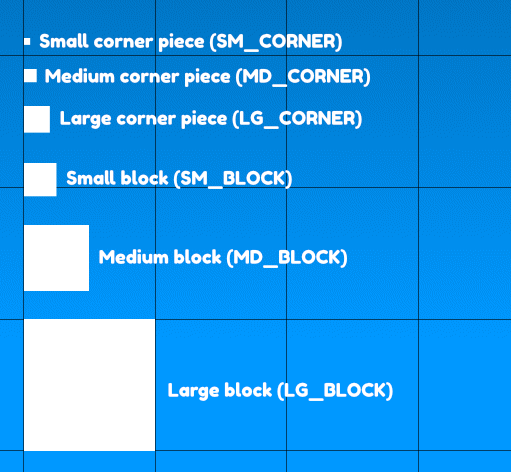
To specify a different pixel type, add:
pixel_type=spwnbmp.PIXELS.<type>
as an argument to the bmp_to_objects macro.
*:
group_factory is the macro used to generate the groups for each of the pixels.
Two objects are provided as arguments:
- arg[0]
{x, y, raw_x, raw_y}-> positions of the pixels.xandyare different toraw_xandraw_yifpixel_densityhas been changed. - arg[1]
{bmp, start_x, start_y, start_id_group, pixel_scale, pixel_density, start_group}-> extra data for whatever code runs within in the macro.
Notes:
- The function MUST return:
@numberor@group - If you are supplying a custom macro,
start_id_grouphas to be set to a group that is not next free (ie:1g) - Groups are added starting in the bottom left and going up in the
Yaxis.
**:
Pixel density must be a square number. For instance, to double the density, set pixel_density to 4 since 2*2 == 4. (for 3X size, 3*3 == 9 so pixel density would be set to 9).