
🏠 Homeserver management made easy on your ASUSTOR NAS





- 🤔 What is Runtipi?
- 🏪 Custom App Stores
⚠️ Prerequisites- ⚡ Quick Start
- ✨ Features
- ⚙️ Configuration
- 💾 Backup & Restore
- 🔐 Cloudflare SSL Setup
- 🔄 Upgrade Guide
- 🔧 Troubleshooting
- 🛠️ Developer Guide
- 🙏 Acknowledgements
Runtipi is an open-source homeserver management platform that makes self-hosting easy and accessible to everyone.
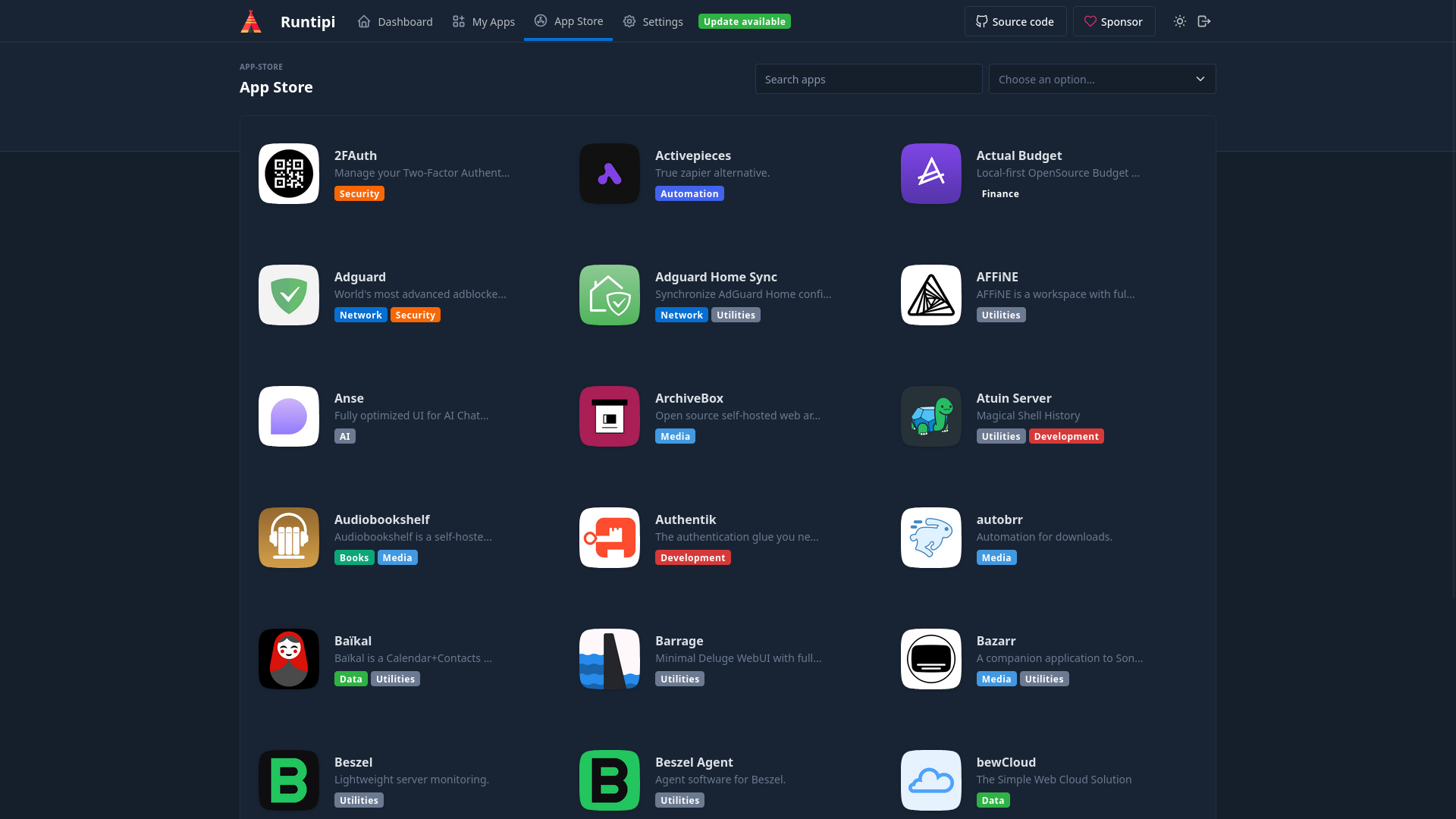
With Runtipi, you can:
- 🚀 Install 200+ apps with one click (Plex, Nextcloud, Home Assistant, etc.)
- 🔒 Automatic HTTPS with built-in Traefik reverse proxy
- 🌐 Custom domains for each app (e.g.,
plex.yourdomain.com) - 💾 Easy backups and app management
- 🎨 Beautiful web UI - no command line needed!
Tip
This package brings Runtipi to your ASUSTOR NAS, fully integrated with ADM!
One of Runtipi's best features is the ability to add third-party app stores alongside the official one! This means you can access hundreds of additional apps curated by the community.
Simply go to Settings → App Repositories → Add and paste any compatible store URL.


JigSaw's Tipi Store is a community-driven app repository featuring:
- 🎬 Media apps - Plex, Sonarr, Radarr, Prowlarr, Tautulli, Overseerr
- 🔥 Debrid tools - RDT-Client, Decypharr, Byparr
- ⚙️ Automation - Recyclarr, Configarr, Profilarr, Huntarr, autobrr
- 📊 Monitoring - Beszel, Beszel Agent
- 🔐 Auth & Security - Pocket ID, TinyAuth
- 📄 Utilities - Paperless-ngx, Paperless-AI, HomeBox, LubeLogger
https://github.com/JigSawFr/tipi-store
Note
Works perfectly on your ASUSTOR NAS with this package! 🎉
| Requirement | Minimum Version |
|---|---|
| ASUSTOR ADM | 5.1.0+ |
| Docker CE | 28.0.0+ |
| jq | 1.7.1+ |
| Git | 2.45.2+ |
| RAM | 4GB (8GB recommended) |
Note
Install Docker CE, jq, and Git via App Central before installing Runtipi.
Runtipi requires Docker 28.0.0+ and 4GB RAM minimum. Here's the compatibility overview:
| Series | Models | CPU | RAM | Notes |
|---|---|---|---|---|
| Flashstor | FS6706T, FS6712X | Intel N5105/5095 | 4-8GB | ⭐ Excellent performance |
| Lockerstor Gen2 | AS6704T, AS6706T | Intel N5105 | 4-8GB | ⭐ Recommended |
| Lockerstor Gen1 | AS6602T, AS6604T | Intel J4125 | 4-8GB | ✅ Full support |
| Lockerstor Pro | AS7112RDX, AS7116RDX | Intel Xeon | 8GB+ | ✅ Enterprise-ready |
| Nimbustor | AS5402T, AS5404T | Intel N5105 | 4GB | ✅ Full support |
| Nimbustor | AS5202T, AS5304T | Intel J4005/J4105 | 2-4GB |
| Series | Models | CPU | RAM | Issue |
|---|---|---|---|---|
| Drivestor Pro | AS3302T, AS3304T | Realtek RTD1296 | 2GB | |
| Drivestor 4 Pro | AS3304T v2 | Realtek RTD1619B | 2GB |
| Series | Models | Reason |
|---|---|---|
| Drivestor | AS1102T, AS1104T | 1GB RAM - Below minimum |
| Older models | AS-2xx, AS-3xx | No ADM 5.x / Docker 28+ support |
- RAM is the main blocker - Runtipi needs 4GB minimum, 8GB recommended
- Docker 28.0.0+ - Required by Runtipi 4.x (available on ADM 5.1+)
- x86-64 vs ARM64 - Both architectures supported, x86-64 recommended for best app compatibility
Tip
If your NAS has 2GB RAM, consider upgrading to 4GB+ for the best experience. Many ASUSTOR models support RAM upgrades.
-
Download the
.apkfor your architecture from Releases:io.runtipi_x.x.x_x86-64.apkfor Intel/AMD NASio.runtipi_x.x.x_arm64.apkfor ARM64 NAS (AS33xx, AS11xx, etc.)
-
Install via App Central → Manual Install → Select the
.apkfile -
Access Runtipi at
https://<NAS_IP>:4443
| Setting | Default |
|---|---|
| 📁 Data directory | /share/Docker/RunTipi |
| 🌐 HTTP port | 8880 |
| 🔒 HTTPS port | 4443 |
- 🚀 One-click app installation via beautiful web UI
- 🔒 Automatic HTTPS with Traefik reverse proxy
- 💾 Pre-upgrade backups created automatically
- 🔄 Easy upgrades preserving all your data
- 📊 Unified logging with emoji indicators
- 🌐 Cloudflare DNS challenge support for wildcard SSL
- 🏗️ ARM64 support for AS33xx, AS11xx, AS67xx series
Edit /share/Docker/RunTipi/.env to customize:
| Variable | Default | Description |
|---|---|---|
NGINX_PORT |
8880 | HTTP port |
NGINX_PORT_SSL |
4443 | HTTPS port |
DOMAIN |
NAS hostname | Your domain for SSL |
LOCAL_DOMAIN |
tipi.local | Local domain suffix |
GUEST_DASHBOARD |
true | Allow guest access |
PERSIST_TRAEFIK_CONFIG |
false | Keep custom Traefik config |
RUNTIPI_BACKUP_PATH |
auto | Custom backup location |
RUNTIPI_MAX_BACKUPS |
5 | Max backups to keep |
# Edit .env and restart
NGINX_PORT=8080
NGINX_PORT_SSL=8443Runtipi automatically creates a backup before each upgrade:
/share/Docker/RunTipi/backup/runtipi-pre-upgrade-*.tar.gz
# Basic backup (config + state)
/volume1/.@plugins/AppCentral/io.runtipi/scripts/backup.sh

# Full backup (includes app-data)
/volume1/.@plugins/AppCentral/io.runtipi/scripts/backup.sh --full

# Custom destination & retention
/volume1/.@plugins/AppCentral/io.runtipi/scripts/backup.sh -d /share/Backup -m 10# List available backups
/volume1/.@plugins/AppCentral/io.runtipi/scripts/restore.sh --list
# Restore latest
/volume1/.@plugins/AppCentral/io.runtipi/scripts/restore.sh
# Restore specific backup (with dry-run preview)
/volume1/.@plugins/AppCentral/io.runtipi/scripts/restore.sh --dry-run -f /path/to/backup.tar.gzGet wildcard SSL certificates without exposing ports 80/443:
-
Create Cloudflare API Token at https://dash.cloudflare.com/profile/api-tokens
- Permission:
Zone:DNS:Edit
- Permission:
-
Run the helper script:
/volume1/.@plugins/AppCentral/io.runtipi/scripts/cloudflare-setup.sh \
  -e your@email.com \
  -t cf_your_api_token_here \
-d yourdomain.com- Restart and access apps via
https://app.yourdomain.com
| ✅ Preserved | 🔄 Reset |
|---|---|
All apps and data (app-data/) |
CLI binary (updated) |
Configuration (.env, user-config/) |
Package files |
Traefik config (traefik/) |
Forced env vars |
Application state (state/) |
# List backups
/volume1/.@plugins/AppCentral/io.runtipi/scripts/restore.sh --list

# Restore pre-upgrade backup
/volume1/.@plugins/AppCentral/io.runtipi/scripts/restore.sh -f /share/Docker/RunTipi/backup/runtipi-pre-upgrade-*.tar.gz| Log | Path |
|---|---|
| 📦 Package logs | /share/Docker/RunTipi/logs/package.log |
| 🖥️ CLI logs | /share/Docker/RunTipi/logs/cli.log |
| 🌐 Traefik logs | /share/Docker/RunTipi/traefik/logs/traefik.log |
/volume1/.@plugins/AppCentral/io.runtipi/scripts/status.sh| Error | Solution |
|---|---|
Port already in use |
Change ports in .env |
Docker missing |
Install Docker CE via App Central |
CLI not found |
Reinstall package or chmod +x the CLI |

Ask questions on the dedicated #asustor channel in the Runtipi Discord!
See DEVELOPER.md for:
- 🔨 Build system (
python build/build.py) - 🏷️ Version management
- 📝 Changelog generation
- 🧪 Testing procedures
See CONTRIBUTING.md for contribution guidelines.
- Runtipi - The amazing homeserver platform
- ASUSTOR - NAS hardware and ADM
- ❤️ My friends from the Runtipi dev team & contributors - For their awesome work and support!
- All contributors and testers!





📦 Releases • 🐛 Issues • 📋 Changelog • 💬 Discord • ☕ Support • 📚 Runtipi Docs

