Unicode text rendering for Pillow with automatic per-character font fallback, variable fonts, BiDi/RTL, gradients, outlines, shadows, and emoji.




Pillow's built-in text rendering uses a single font, so any character not covered by that font shows up as a blank box ("tofu"). FontStack fixes this by walking an ordered list of fonts per character, the same fallback strategy browsers and operating systems use. It also handles right-to-left scripts, Arabic contextual shaping, variable fonts, TrueType Collections, and emoji.
- Per-character font fallback using fonttools for accurate cmap parsing across TTF, OTF, and collection formats.
- Font directory scanning via
font_dir=constructor arg orscan_font_dir()-- point to a folder of fonts and skip manualFontConfigwiring. Fonts are loaded in alphabetical order by filename, so the first file becomes the primary font. - RTL/BiDi support via
python-bidifor Unicode BiDi reordering. Arabic text is reshaped witharabic-reshaperbefore rendering so letters connect correctly under Pillow's BASIC layout engine. - Emoji rendered via Pilmoji / Twemoji with correct baseline alignment across mixed font and emoji runs.
- Gradient fills on text, outlines, and shadows via dash-separated color strings (e.g.
"red-blue","#FF0000-#00FF00") or the"rainbow"preset. Gradients are slightly diagonal so multi-line text gets natural color variation per line. - Text outlines (strokes) with configurable thickness and color, including gradient outlines.
- Drop shadows with configurable color and offset. Shadow shape includes the outline when
stroke_width > 0. Supports gradient shadow colors. - Variable font support: set axes by integer value (
weight=700setswght) or by named style (weight="Bold"). TypedVariationAxesfor IDE autocomplete on standard axes. - TrueType/OpenType Collection support (
.ttc/.otc) viattc_indexonFontConfig. - Two rendering modes:
"wrap"breaks text across lines at a max width;"scale"shrinks the font to fit, truncating with...as a last resort. - Fit mode (
"fit") combines both: wraps atmax_width, then shrinks the font until the block fits withinmax_height, then truncates the last visible line with...if necessary.min_sizesets the floor for both scale and fit modes. - Left, center, and right alignment within the text block.
- Anchor points (
anchor=) onFontManager.draw(): choose which corner, edge midpoint, or centre of the text block lands atpositionusing PIL-style two-character codes ("lt","mm","rb", etc.). - LRU caching on both font objects and cmap data; repeated renders with the same stack/size/weight are essentially free.
- Fully typed:
Literalonmodeandalign,@overloadsignatures that surfacemin_sizeonly whenmode="scale"ormode="fit"andmax_heightonly whenmode="fit", PEP 561py.typedmarker.
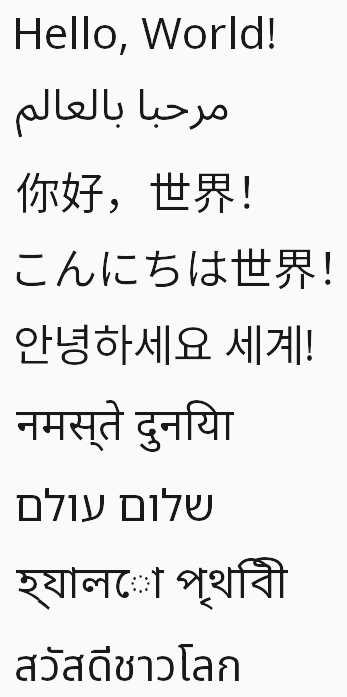 Nine languages, one stack |
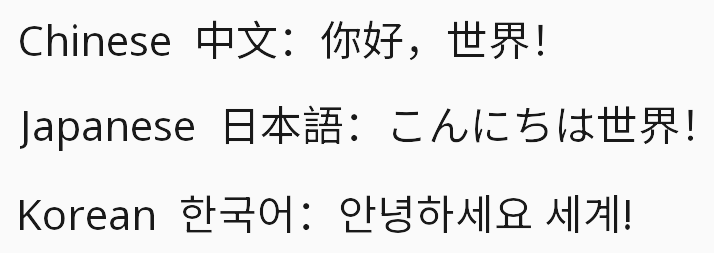 Chinese · Japanese · Korean |
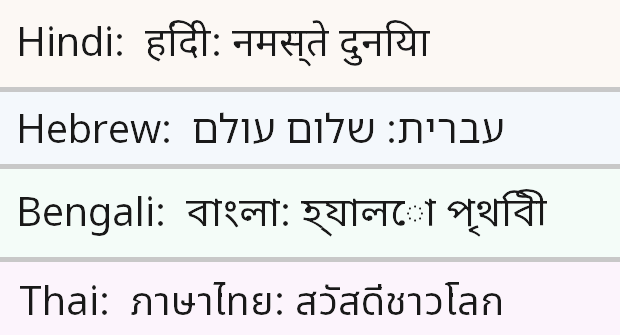 Devanagari · Hebrew · Bengali · Thai |
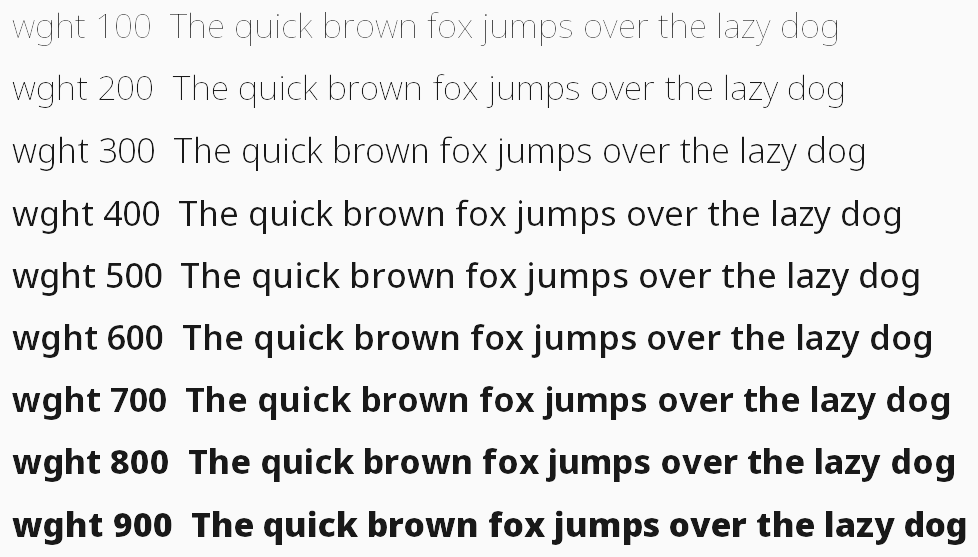 Variable font weight axis (wght 100–900) |
 Mixed Arabic + Latin - BiDi reordering applied automatically |
|
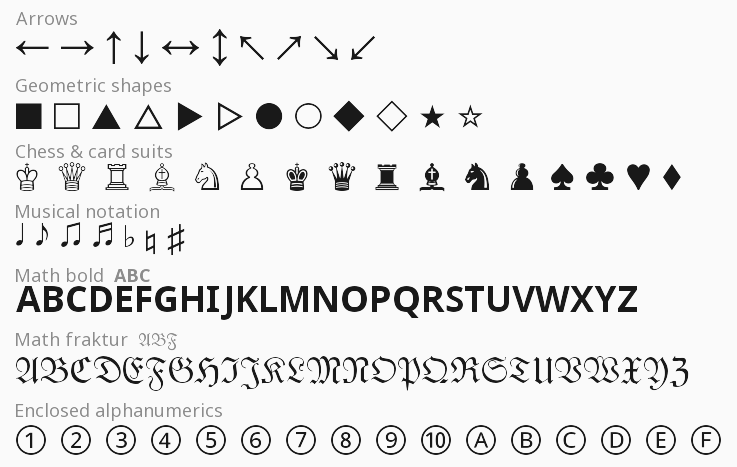 Symbols · Math alphanumerics · Box drawing · Arrows |
|
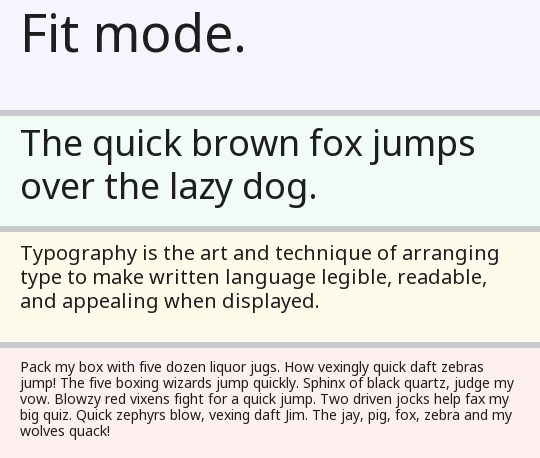 Fit mode - wrap → shrink → truncate, all four strips share the same bounding box |
|
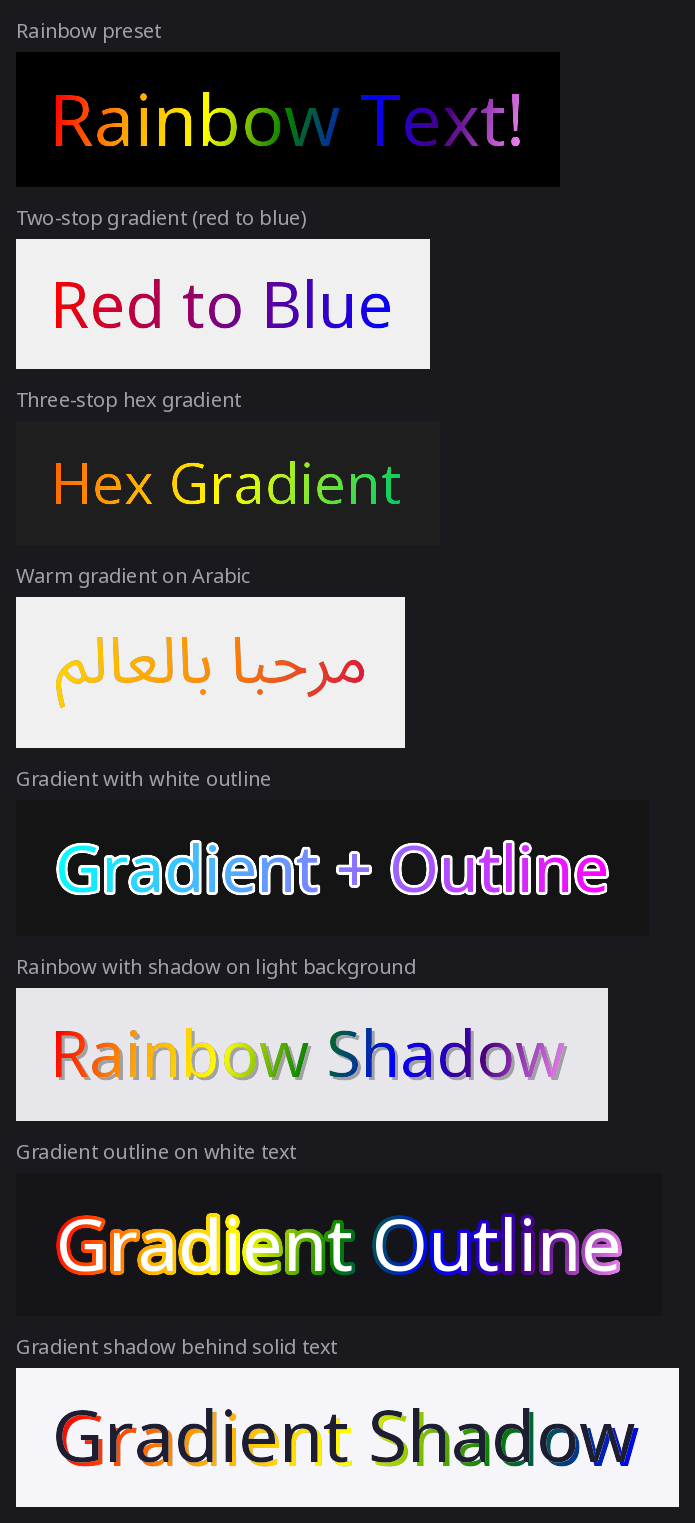 Gradient fills, gradient outlines, gradient shadows |
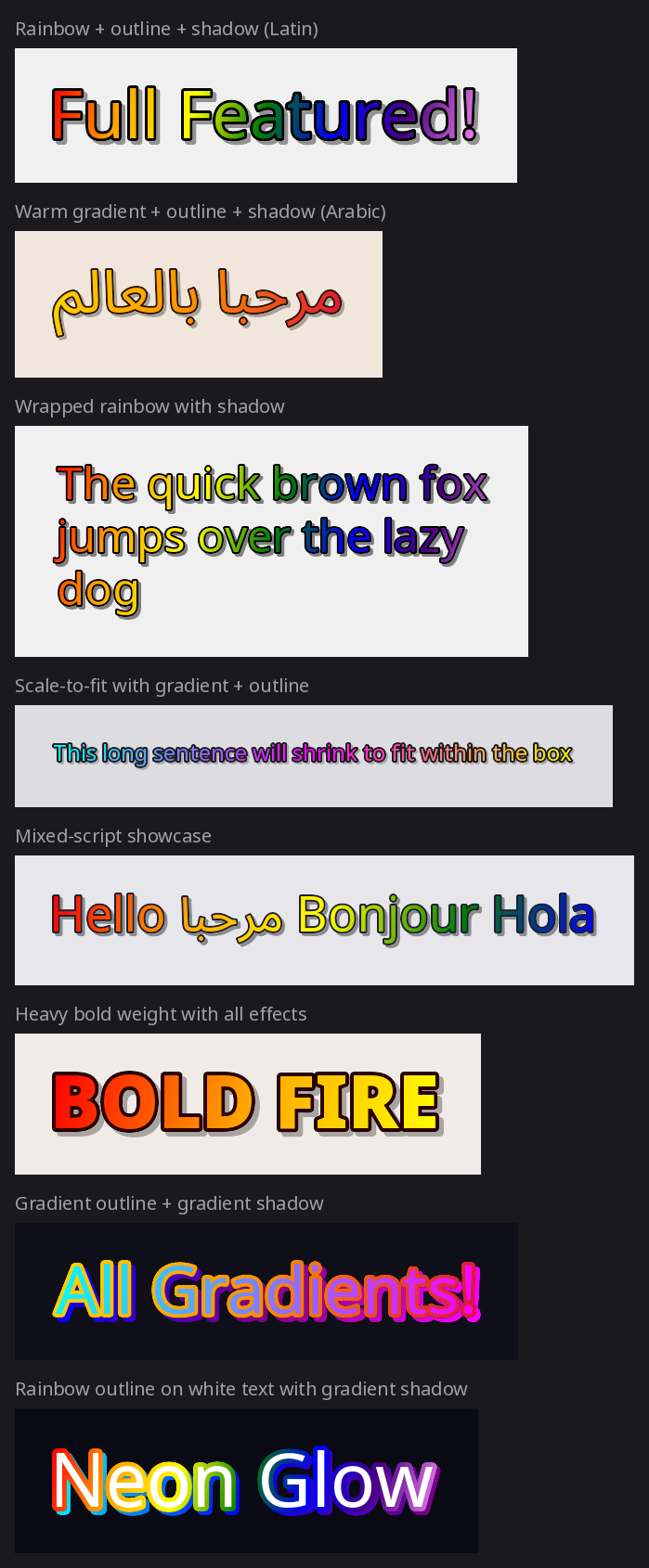 All effects combined - gradient + outline + shadow |
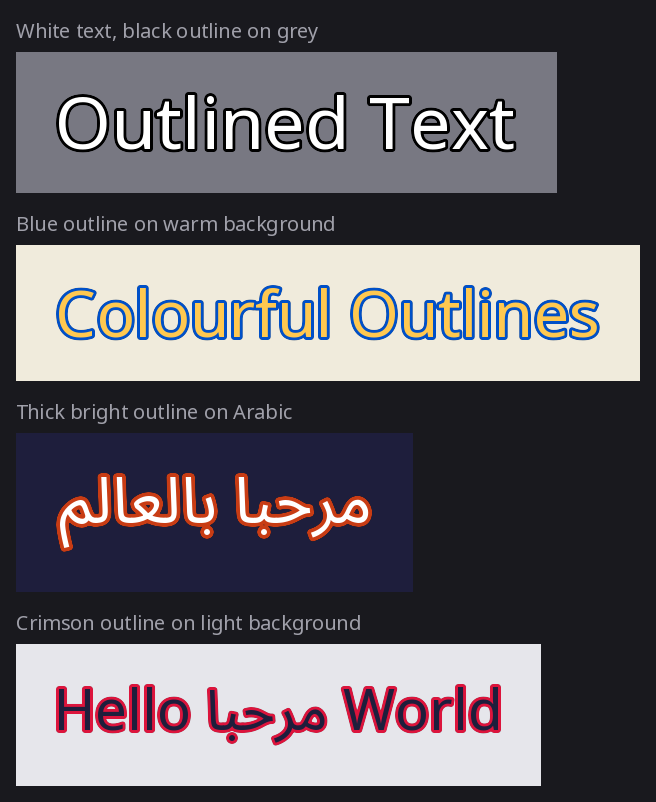 Text outlines on Latin, Arabic, and mixed scripts |
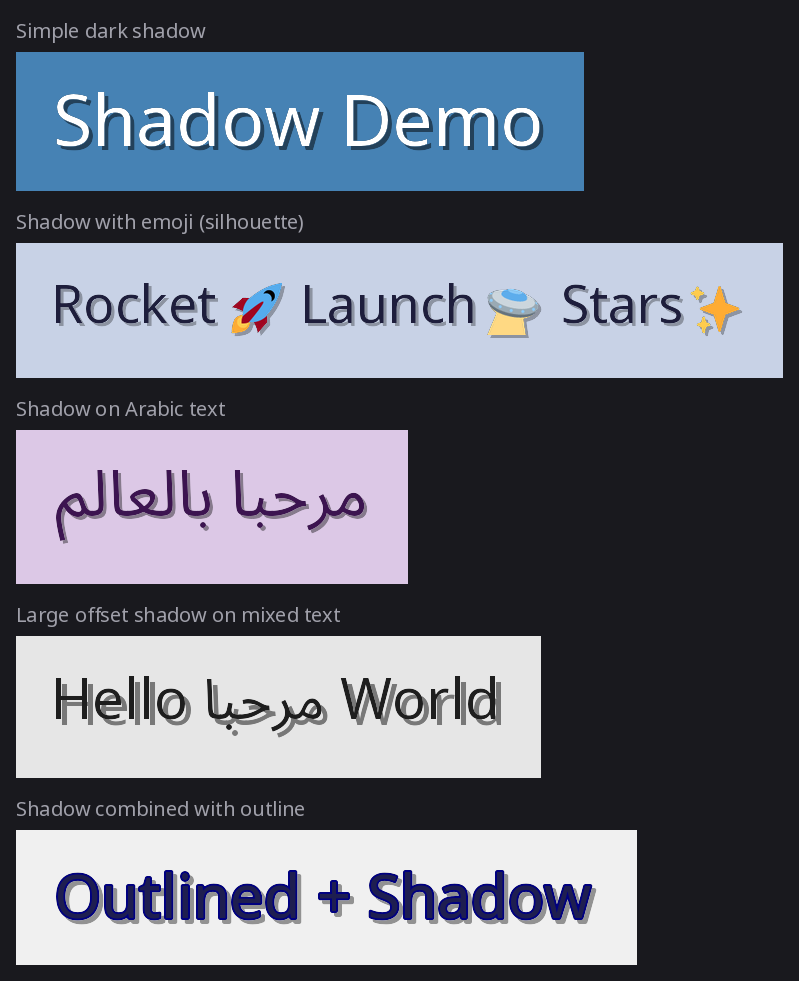 Drop shadows with emoji silhouettes |
pip install fontstackNote: FontStack does not bundle fonts. See Recommended Font Stack below for a curated set of free Noto fonts that provide near-complete Unicode coverage.
from fontstack import FontConfig, FontManager

manager = FontManager(
    default_stack=[
        FontConfig(path="fonts/NotoSans[wdth,wght].ttf"),
        FontConfig(path="fonts/NotoSansArabic[wdth,wght].ttf"),
    ]
)

# Or point to a directory and let FontStack discover all fonts
# (loaded alphabetically by filename - first file = primary font):
# manager = FontManager(font_dir="fonts/")

from PIL import Image

img = Image.new("RGBA", (800, 100), "white")
manager.draw(
    image=img,
    text="Hello مرحبا",
    position=(20, 20),
    size=48,
    weight=700,
    fill=(20, 20, 20),
)
img.save("output.png")from fontstack import FontConfig, FontManager, VariationAxes
# Option 1: explicit font stack (full control over fallback order)
manager = FontManager(
default_stack=[
# Primary font: Noto Sans variable (Latin, Cyrillic, Greek)
FontConfig(path="fonts/NotoSans[wdth,wght].ttf"),
# Fallback 1: Noto Sans Arabic (Arabic, Persian, Urdu)
FontConfig(path="fonts/NotoSansArabic[wdth,wght].ttf"),
# Fallback 2: Noto Sans SC/JP/KR (Simplified Chinese / Japanese / Korean)
FontConfig(path="fonts/NotoSansSC[wght].ttf"),
FontConfig(path="fonts/NotoSansJP[wght].ttf"),
FontConfig(path="fonts/NotoSansKR[wght].ttf"),
]
)
# Option 2: scan a directory (auto-discovers all .ttf/.otf/.ttc/.otc files)
# Fonts are loaded in alphabetical order by filename, so the first file
# becomes the primary font and later files act as fallbacks.
manager = FontManager(font_dir="fonts/")
from PIL import Image
img = Image.new("RGBA", (1000, 200), "white")
w, h = manager.draw(
image=img,
text="Hello 世界 مرحبا 🌍",
position=(20, 40),
size=48,
weight=700,
mode="wrap",
max_width=960,
align="center",
fill=(30, 30, 30),
)
print(f"Rendered {w}×{h} px")
img.save("output.png")Returns a new PIL.Image.Image cropped tightly to the rendered text, no canvas management needed.
from fontstack import FontConfig, draw_text

img = draw_text(
    text="Hello 世界 مرحبا 🌍",
    font_stack=[
        FontConfig(path="fonts/NotoSans[wdth,wght].ttf"),
        FontConfig(path="fonts/NotoSansArabic[wdth,wght].ttf"),
    ],
    size=48,
    weight=700,
    fill=(20, 20, 20),
    background="white",
    padding=16,
)
img.save("hello.png")from fontstack import FontConfig, VariationAxes
# Narrow, light weight, slightly slanted
FontConfig(
path="fonts/NotoSans[wdth,wght].ttf",
axes=VariationAxes(wght=300.0, wdth=75.0, slnt=-10.0),
)Standard axes in VariationAxes: wght (weight, 100–900), wdth (width, 50–200), ital (italic, 0–1), slnt (slant, degrees), opsz (optical size).
# "wrap" - word-wrap at max_width, font size unchanged
manager.draw(img, long_text, position=(0, 0), size=32,
                    mode="wrap", max_width=400)

# "scale" - shrink font until the full text fits on a single line;
#             truncates with "…" if the text is still too wide at min_size
manager.draw(img, long_text, position=(0, 0), size=32,
                    mode="scale", max_width=400, min_size=10)

# "fit" - wrap first, then shrink until the block fits within max_width × max_height;
#           if the block still overflows at min_size the last visible line is
#           truncated with "…"
manager.draw(img, long_text, position=(0, 0), size=32,
mode="fit", max_width=400, max_height=120, min_size=10)anchor controls which point of the text block is placed at position.
Useful for centering labels, pinning captions to corners, or aligning text
to UI grid lines without manual offset math.
lt ── mt ── rt
│           │
lm    mm    rm
│           │
lb ── mb ── rb
# Centre text on a specific pixel (badge, map pin, etc.)
manager.draw(img, "Hello", position=(400, 200), size=48, anchor="mm")

# Bottom-right: text ends exactly at a corner
manager.draw(img, "caption", position=(img.width - 16, img.height - 16),
                    size=20, anchor="rb")

# Top-center: heading centered at the top edge of a box
manager.draw(img, "Title", position=(box_cx, box_top), size=32, anchor="mt")
Typographic vertical centering: The middle (
m) vertical anchor centers on the cap height of the text — the region from the visual top of capital letters down to the baseline — rather than on the full rendered bounding box. This means strings with descenders (g,y,p, …) and strings without descenders share the same cap-top position when drawn at the samey, producing visually consistent rows (e.g. leaderboard entries, stat lines). Descenders hang below the center point as they do in traditional typography.
# Gradient fill (diagonal by default so each line gets different hues)
manager.draw(img, "Gradient!", position=(20, 20), size=64,
                    fill="red-gold-orange")

# Pure left-to-right gradient (no diagonal)
manager.draw(img, "Gradient!", position=(20, 20), size=64,
                    fill="red-gold-orange", gradient_angle=0.0)

# Outline with solid stroke color
manager.draw(img, "Outlined", position=(20, 120), size=64,
                    fill="white", stroke_width=3, stroke_fill="black")

# Drop shadow (shadow includes the outline shape when stroke_width > 0)
manager.draw(img, "Shadow", position=(20, 220), size=64,
                    fill="white", shadow_color=(0, 0, 0, 120),
                    shadow_offset=(4, 4))

# Everything at once: gradient fill + gradient outline + gradient shadow
manager.draw(img, "All Effects!", position=(20, 320), size=64,
                    fill="red-orange-gold",
                    stroke_width=3, stroke_fill="blue-cyan",
                    shadow_color="gray-darkgray", shadow_offset=(3, 3))

# Rainbow preset
manager.draw(img, "Rainbow!", position=(20, 420), size=64,
fill="rainbow")Reusing a FontManager across many draw_text calls avoids re-parsing cmaps for every image.
from fontstack import FontConfig, FontManager, draw_text

mgr = FontManager(default_stack=[FontConfig(path="fonts/NotoSans[wdth,wght].ttf")])

labels = ["First", "Second", "Third", ...]
images = [draw_text(label, font_stack=[], manager=mgr, size=32) for label in labels]All fonts below are from Google's Noto family, licensed under the SIL Open Font License 1.1 (free for commercial use).
| # | Font | Scripts covered | Size | Download |
|---|---|---|---|---|
| 1 | Noto Sans [wdth,wght].ttf |
Latin, Cyrillic, Greek, Latin Extended | ~1.1 MB | Google Fonts |
| 2 | Noto Sans Arabic [wdth,wght].ttf |
Arabic, Persian, Urdu | ~840 KB | Google Fonts |
| 3 | Noto Sans SC [wght].ttf |
Simplified Chinese | ~17 MB | Google Fonts |
| 4 | Noto Sans JP [wght].ttf |
Japanese | ~9.4 MB | Google Fonts |
| 5 | Noto Sans KR [wght].ttf |
Korean | ~10 MB | Google Fonts |
| 6 | Noto Sans Devanagari [wdth,wght].ttf |
Hindi, Sanskrit, Marathi, Nepali | ~632 KB | Google Fonts |
| 7 | Noto Sans Hebrew [wdth,wght].ttf |
Hebrew, Yiddish | ~110 KB | Google Fonts |
| 8 | Noto Sans Bengali [wdth,wght].ttf |
Bengali, Assamese | ~454 KB | Google Fonts |
| 9 | Noto Sans Thai [wdth,wght].ttf |
Thai | ~214 KB | Google Fonts |
Emoji are handled by Pilmoji/Twemoji automatically, no emoji font needed in the stack.
Create with an explicit default_stack or a font_dir path (mutually exclusive). When font_dir is given, all .ttf, .otf, .ttc, .otc files in the directory are scanned and sorted alphabetically by filename (case-insensitive). The first file in that order becomes the primary font; the rest serve as fallbacks.
| Method / Property | Returns | Description |
|---|---|---|
draw(image, text, position, ...) |
tuple[int, int] |
Draw text onto an existing image in-place. Returns (width, height) of the rendered bounding box. |
get_font_chain(size, weight, custom_stack) |
list[FreeTypeFont] |
Return loaded font objects for the given size/weight (LRU-cached). |
default_stack |
list[FontConfig] |
Read-only copy of the stack (auto-built from font_dir if used). |
font_dir |
str | Path | None |
The font directory passed at construction, or None. |
| Parameter | Type | Default | Description |
|---|---|---|---|
size |
int |
40 |
Starting font size in points. |
weight |
int | str |
400 |
Font weight axis value or named style string (e.g. 700 or "Bold"). |
mode |
"wrap" | "scale" | "fit" |
"wrap" |
Rendering mode. |
max_width |
int | None |
None |
Maximum line width in pixels. |
max_height |
int | None |
None |
Maximum block height in pixels ("fit" mode only). |
min_size |
int |
12 |
Minimum font size for "scale" and "fit" modes. |
align |
"left" | "center" | "right" |
"left" |
Horizontal alignment within the text block. |
anchor |
"lt" … "rb" |
"lt" |
Which point of the text block lands at position. Two-char PIL-style code: horizontal (l/m/r) + vertical (t/m/b). |
line_spacing |
float |
1.2 |
Line-height multiplier (1.0 = tight, 1.5 = loose). |
fill |
FillType |
"black" |
Text color: color name, RGB/RGBA tuple, palette integer, or gradient string. |
stroke_width |
int |
0 |
Outline thickness in pixels around each glyph. |
stroke_fill |
FillType | None |
None |
Outline color. Same value types as fill, including gradients. |
shadow_color |
FillType | None |
None |
Drop-shadow color. Same value types as fill, including gradients. |
shadow_offset |
tuple[int, int] |
(2, 2) |
Shadow pixel offset (x, y). |
gradient_angle |
float |
15.0 |
Gradient direction in degrees (0 = left-to-right, 15 = slight diagonal). |
font_stack |
list[FontConfig] | None |
None |
Per-call font stack override; falls back to default_stack. |
emoji_source |
BaseSource |
Twemoji |
Pilmoji emoji image source. |
Convenience wrapper: creates a FontManager (or reuses one via manager=), renders text, and returns a new RGBA image cropped to the result with optional padding and background. Also accepts font_dir= as an alternative to font_stack.
Scan a directory for font files (.ttf, .otf, .ttc, .otc) and return a list of FontConfig entries sorted alphabetically by filename (case-insensitive). The first entry becomes the primary font when passed to FontManager. TTC/OTC collections produce one entry per member font. Useful for inspecting what font_dir= will discover, or for building a custom stack from a directory listing.
| Field | Type | Default | Description |
|---|---|---|---|
path |
str |
required | Path to TTF, OTF, TTC, or OTC file. |
axes |
VariationAxes | None |
None |
Default variable font axis values. |
ttc_index |
int |
0 |
Index within a TTC/OTC collection. |
wght · wdth · ital · slnt · opsz
- Python 3.11+
- Pillow ≥ 12.2
- pilmoji ≥ 2.0.5
- fonttools ≥ 4.62
- python-bidi ≥ 0.6.7
- arabic-reshaper ≥ 3.0.0
MIT © 2026 Kanin