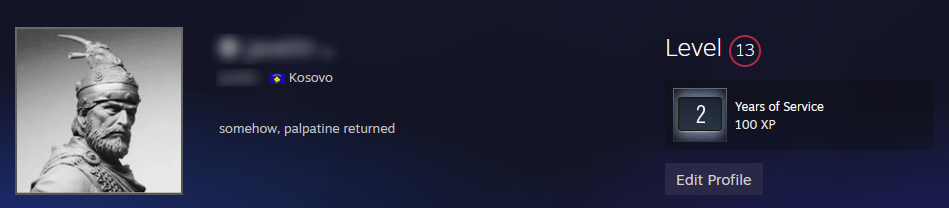
This is a very simple extension that fixes the missing Kosovo flag on steamcommunity profile.
The extension works by detecting if you’re viewing a Steam profile on steamcommunity.com. When it identifies the Kosovo flag (represented by a .gif file), it automatically replaces the missing flag with the correct one stored within the extension.
After waiting patiently for years in hopes that Valve would address this oversight, I took matters into my own hands and developed this solution. Thanks for doing nothing over a simple 10 second flag addition Valve.
Learn more about the background of this project on my blog: Fixing the Kosovo Flag Issue on Steam
- Firefox: Get it on Firefox Add-ons
- Chrome: I’m not paying $5 to upload MY OWN work to a massive corporation. Download the source code and install it locally.
Since the Chrome Web Store requires a fee to publish, you can install this extension manually in your browser by following these steps:
- Download or clone the extension source code to your computer.
- Open Chrome and go to:
chrome://extensions/ - Enable Developer mode (toggle switch in the top right corner).
- Click Load unpacked.
- Select the folder where you saved the extension source code.
- The extension will load and appear in your extension list.
- Download or clone the extension source code to your computer.
- Open Edge and go to:
edge://extensions/ - Enable Developer mode (toggle switch in the bottom left corner).
- Click Load unpacked.
- Select the folder where you saved the extension source code.
- The extension will load and appear in your extension list.
- You are NOT allowed to use this code for commercial purposes.
- You are NOT allowed to copy, redistribute, or modify this code.
- You are NOT allowed to upload or mirror this code elsewhere.
- This code is provided for personal use only.
- All rights reserved by the author.