
AI Agent · Data Canvas · Linux Sandbox — on your phone.




Website · Download APK · Privacy · Contact

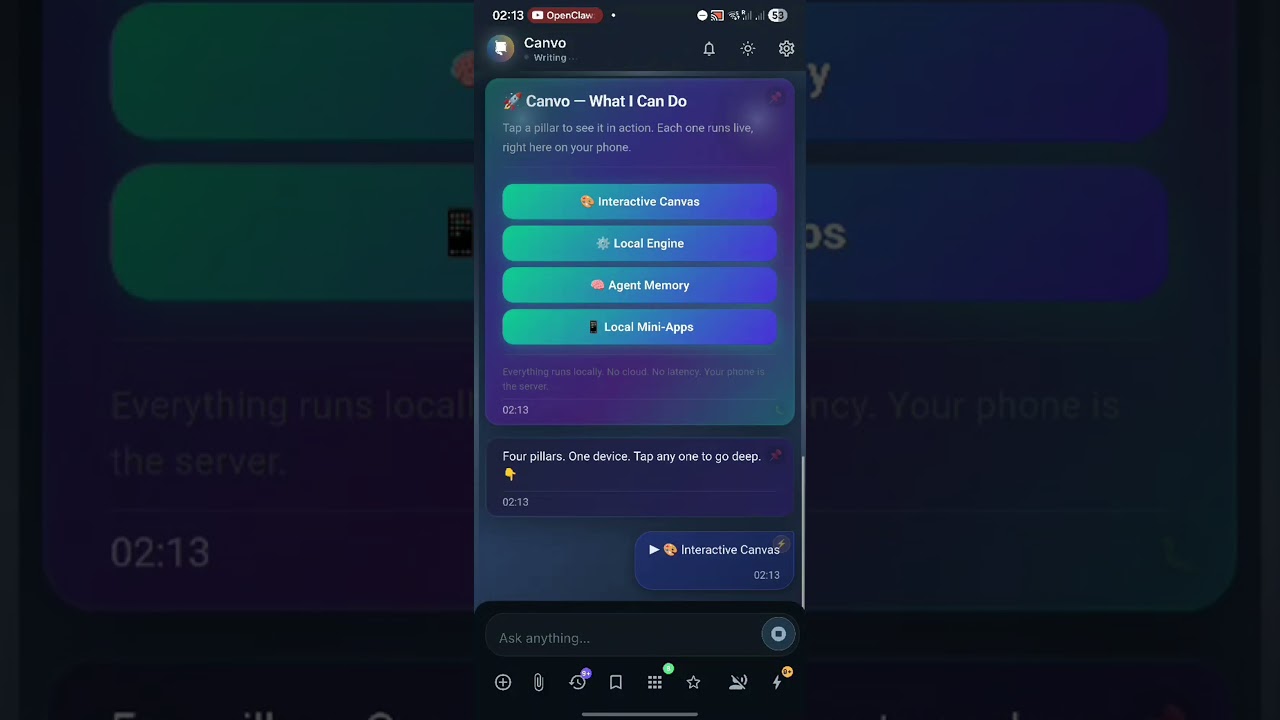
Canvo turns your phone into a full AI workstation. It's not a chatbot — it's an AI agent with a live interactive canvas, a real Linux environment, and tools that multiply.
Chat naturally, and the agent renders your world: dashboards, charts, quizzes, emails, schedules, budget trackers — right in the conversation. Every response is a living, interactive workspace.
Your agent renders. You interact.
- Cards, charts, tables, forms, toggles, progress bars
- Animated D3 visualizations with real-time controls
- Quizzes, interactive maps, mini-games
- Every response is a living workspace
A real shell on your phone.
- 300+ Unix commands — grep, awk, curl, wget…
- Install Python, Node.js, Git, FFmpeg, and more
- Build full web apps that run locally
- Persistent workspace across sessions
If a tool doesn't exist, the agent builds it.
- Web search, calendar, contacts, clipboard
- File I/O, notifications, TTS, timers
- Self-building tool scripts — saved and reused
- Heartbeat: scheduled autonomous tasks


- Bring Your Own Keys — OpenAI, Anthropic, Gemini, Groq, Mistral, OpenRouter, Ollama, LM Studio, or any OpenAI-compatible endpoint
- Local-First — All conversations, files, and agent memory stay on your device
- No account required — No cloud sync, no telemetry
- Google OAuth — Optional sign-in for Gemini access (no API key needed)
- Download the latest APK from Releases
- On your Android device, enable Settings → Install unknown apps for your browser
- Open the downloaded APK and tap Install
- Launch Canvo and configure your AI provider in Settings
Requirements: Android 13+ · arm64-v8a
- VirusTotal: 0/66 detections — verified clean
- SHA256:
96a3b047a31f26a5acf53bc6032af3ecd10d3fc188760b0c64dff205b89f4c00
Canvo isn't just reactive. Schedule autonomous agent tasks that fire throughout the day:
- ⏰ Heartbeat — Autonomous scheduled tasks
- 🧠 Memory — Persistent knowledge base that grows
- 🔔 Proactive — Morning briefings, reminders, standups
Your agent wakes up, reads your notes, searches the web, and sends notifications — without you touching the screen.
Switch between AI providers per session. Use the best model for the task. You can also manually enter any model name — if your provider supports it, Canvo will use it.
| Provider | Example Models |
|---|---|
| Google Gemini | Gemini 3 Flash, Gemini 3.1 Pro, Gemini 2.5 Flash |
| Anthropic | Claude Sonnet 4.6, Claude Opus 4.6 |
| OpenAI | GPT-5.2, GPT-5.3 Codex |
| Groq | Llama, Mixtral |
| Local | Ollama, LM Studio |
| OpenRouter | 100+ models |
| Custom | Any OpenAI-compatible endpoint |
Canvo is in active beta development. We're looking for early testers to help shape the product:
- 🐛 Found a bug? Open an issue
- 💡 Feature idea? Start a discussion
- 📧 Direct feedback: dev@canvo.cloud
Every piece of feedback helps us build a better experience. Thank you for testing! 🙏
- Email: dev@canvo.cloud
- Website: canvo.cloud
© 2026 Canvo App · Built for builders.