




⚠️ Important Announcement
Due to personal health reasons, this project is now on hold until April, 2026. No support and no updates will be available until then, however PR's are still very much welcome and will be reviewed ASAP. Thank you for the understanding and sorry for any inconvenience!
This Home Assistant integration provides support for ecoMAX controllers manufactured by Plum Sp. z o.o..
It uses the PyPlumIO library and supports connection to ecoMAX controllers via RS-485 over Ethernet/Wi‑Fi converters or RS-485 to USB adapters.
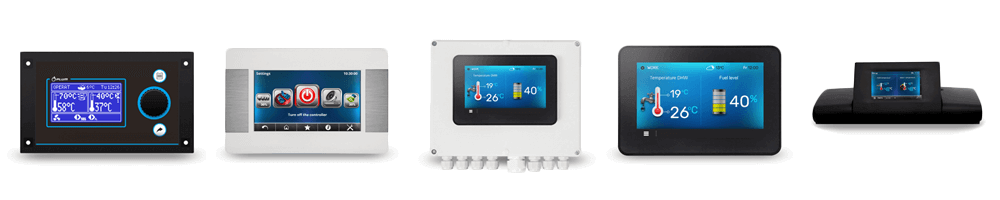
You can connect your ecoMAX controller in two ways:
- Directly to the machine running Home Assistant using an RS-485 to USB adapter.
- Wirelessly via an RS-485 to Wi‑Fi converter so the Home Assistant host can be remote from the boiler.
Locate the RS-485 terminal on the ecoMAX (pins labeled "D+" and "D-") and wire your adapter as follows:
| Adapter | ecoMAX |
|---|---|
| A | D+ |
| B | D- |
| GND | GND (optional) |
This integration is built upon the PyPlumIO library, which was originally designed as an alternative to the ecoNET 300 device. For users who possess the original ecoNET 300 from Plum, Patryk B has developed an excellent Home Assistant integration.
The development of this ecoNET 300 integration has been resumed by jontofront, ensuring that it receives regular updates and fixes. If you own an ecoNET 300 device, I encourage you to explore this integration.
HACS is the recommended installation method. Click the button below to install via HACS:

Manual installation (click to expand)
- Clone the repository:
git clone https://github.com/denpamusic/homeassistant-plum-ecomax- Copy the
custom_componentsdirectory to your Home Assistant configuration folder (next to configuration.yaml):
cp -r ./homeassistant-plum-ecomax/custom_components ~/.homeassistant- Restart Home Assistant.
Add the Plum ecoMAX integration from Home Assistant's UI:
Settings → Devices & Services → Add Integration → search for "Plum ecoMAX".
Choose the connection type:
- Network (RS-485 to Wi‑Fi): provide Host and Port.
- Serial: provide Device path and Baudrate.
If running Home Assistant in Docker, ensure the adapter device is mapped into the container.
The integration exposes entities on the main controller device and its sub-devices. Available entities depend on your controller model and connected modules. Unsupported entities will be disabled during setup.
Note: ecoMAX pellet boiler controller model names use a "p" suffix (e.g., ecoMAX 850p), while installation controllers use an "i" suffix (e.g., ecoMAX 850i).
Legend:
- i — ecoMAX installation controller
- p — ecoMAX pellet boiler controller
Note: Temperature changes smaller than 0.1°C are > ignored to reduce Home Assistant database clutter.
Sensors (click to expand)
- Heating temperature
- Heating temperature
- Water heater temperature
- Outside temperature
- Heating target temperature
- Water heater target temperature
- Heating mode
- Exhaust temperature
- Feeder temperature
- Return temperature
- Heating load
- Fan power
- Fuel level
- Fuel consumption
- Total fuel burned¹
- Heating power
- Lower buffer temperature²
- Upper buffer temperature²
- Flame intensity²
- Oxygen level³
- Solar temperature i
- Fireplace temperature i
¹ Meter entity: counts burned fuel while Home Assistant runs.
² Requires controller support.
³ Requires ecoLAMBDA module.
Binary sensors (click to expand)
- Heating pump state
- Water heater pump state
- Circulation pump state
- Fan state
- Lighter state
- Exhaust fan state
- Fireplace pump state i
- Solar pump state i
Selects (click to expand)
- Summer mode (on, off, auto)
Switches (click to expand)
- Controller power
- Water heater disinfection
- Water heater pump
- Weather control p
- Fuzzy logic p
- Heating schedule p
- Water heater schedule p
Numbers (click to expand)
- Heating temperature p
- Minimum heating power p
- Maximum heating power p
- Minimum heating temperature p
- Maximum heating temperature p
- Grate mode temperature p
- Fuel calorific value p
Diagnostics (click to expand)
- Alert
- Connection status
- Service password
- Connected modules
The integration provides a Home Assistant water heater entity for indirect water heaters. You can set target temperature, toggle priority mode, or turn the heater off.
Home Assistant heater states map to ecoMAX modes:
| Home Assistant Heater State | ecoMAX Heater Mode |
|---|---|
| Performance | Priority Mode |
| Eco | Non-Priority Mode |
Each connected ecoSTER thermostat is exposed as a Home Assistant climate entity, allowing monitoring and control of room temperature and ecoSTER modes.
Mixers (called circuits on installation controllers) are logical devices detected once when the integration is added.
Sensors:
- Mixer temperature
- Mixer target temperature
Binary sensors:
- Mixer pump
Selects:
- Work mode (off, heating, floor, pump_only) p
Switches:
- Enable mixer i
- Enable in summer mode
- Weather control p
- Disable pump on thermostat p
Numbers:
- Mixer temperature
- Minimum mixer temperature
- Maximum mixer temperature
- Day target mixer temperature i — second circuit only
- Night target mixer temperature i — second circuit only
The integration uses the following events:
Fired when the ecoMAX controller issues an alert.
Event data:
name— Config entry namecode— Alert codefrom— Datetime object representing alert start timeto1 — Datetime object representing alert end time
1 Only present if the alert has ended.
This integration provides the following actions:
Retrieve a device parameter by name.
Fields: name
Targets: ecomax, mixer
Response:
name— Parameter namevalue— Parameter valuemin_value— Minimum allowed valuemax_value— Maximum allowed valuedevice_type— Device typedevice_uid— Device unique identifierdevice_index1 — Sub-device identifier
1 Root device (controller) is 0; connected mixers are 1–5.
Set a device parameter by name.
Fields: name, value
Targets: ecomax, mixer
Retrieve schedules from the device.
Fields: type (heating, water_heater), weekdays (monday, tuesday, etc.)
Response: schedules — Dictionary of schedule states keyed by start times
Configure device schedules.
Fields: type (heating, water_heater), weekdays, preset (day, night), start, end
Set a meter entity to a specific value.
Fields: value
Targets: total_fuel_burned
Reset a meter entity value.
Targets: total_fuel_burned
This product is distributed under MIT license.