Automate the process of converting YouTube video content into Medium articles 🎥📝
This program not only converts video transcripts extremely well into beautiful, SEO-optimized articles with images and captions, but also removes any "transcript-like" writing. It produces a real, professional article from a video instead.
- ⚙️ Requirements
- 📦 Installation
- 🪄 Usage
- 🛠️ Configuration
- 🎬 Demo
- 👨🍳 Who is the creator?
- 🤝 Contributing
⚠️ Disclaimer- ⚖️ License

- Python v3.7 or higher 🐍
- A Google account with YouTube API access 🎬
- An OpenAI API key 🧠
- A Medium account with an integration token ✍️
-
Clone this repository:
git clone https://github.com/pH-7/youtube-to-medium-blog-posts-automation.git &&
cd youtube-to-medium-blog-posts-automation
-
Install the required Python packages:
pip install -r requirements.txt -
Set up your configuration file:
-
Create a file named
config.jsonin the project root directory -
Add your API keys and YouTube Channel ID to the file as followed:
{
  "MEDIUM_ACCESS_TOKEN": "YOUR_MEDIUM_ACCESS_TOKEN",
  "MEDIUM_EN_PUBLICATION_ID": "OPTIONAL_ENGLISH_PUBLICATION_ID",
  "MEDIUM_FR_PUBLICATION_ID": "OPTIONAL_FRENCH_PUBLICATION_ID",
  "MEDIUM_TECH_PUBLICATION_ID": "OPTIONAL_TECH_PUBLICATION_ID",
  "POST_TO_PUBLICATION": true, // Whenever we want the post to be published to a specified Medium's publication ID or not
  "OPENAI_API_KEY": "YOUR_OPENAI_API_KEY",
  "OPENAI_MODEL": "gpt-4.1", // non-reasoning models like "gpt-4.1", "gpt-4.1-mini"
  "UNSPLASH_ACCESS_KEY": "YOUR_UNSPLASH_KEY",
  "PUBLISH_STATUS": "draft", // "draft" or "publish

  // Niche configurations
  "NICHES": {
    "self-help": {
      "YOUTUBE_CHANNEL_ID": "YOUR_SELF_HELP_CHANNEL_ID",
      "SOURCE_LANGUAGE": "fr",
      "OUTPUT_LANGUAGES": ["en", "fr"],
      "UNSPLASH_PREFERRED_PHOTOGRAPHER": "pierrehenry", // Optional. Mention a preferred Unsplash photographer (e.g. pierrehenry)
      "ARTICLES_BASE_DIR": "articles"
    },
    "tech": {
      "YOUTUBE_CHANNEL_ID": "YOUR_TECH_CHANNEL_ID",
      "SOURCE_LANGUAGE": "en",
      "OUTPUT_LANGUAGES": ["en"],
      "UNSPLASH_PREFERRED_PHOTOGRAPHER": null,
      "ARTICLES_BASE_DIR": "articles/tech"
    }
  },

  // Active niche to process ("self-help" or "tech" or "all")
  "ACTIVE_NICHE": "all"
}
Multi-Niche Support:
- The script now supports multiple content niches (self-help and tech)
- Each niche has its own YouTube channel, languages, and custom prompts
- Set
ACTIVE_NICHEto"all","self-help", or"tech"to control which niches to process - Tech niche is optimized for "NextGen Dev: AI & Code" technical content
Alternatively, you can refer to
example.config.jsonin the project.
-
-
Set up YouTube API credentials:
- Go to the Google Developers Console
- Create a new project and enable the YouTube Data API v3
- Create credentials (OAuth 2.0 Client ID) for a desktop application. Select External for Use Type
- Download the client configuration and save it as
client_secrets.jsonin the project root directory
-
Lastly, get your Unsplash Access Key at https://unsplash.com/oauth/applications/new
To run the script, use the following command in the project root directory:
python transform-youtube-videos-to-medium-posts.pySelecting which niche to process:
- Edit
ACTIVE_NICHEinconfig.json:"all"- processes all configured niches"self-help"- processes only self-help niche"tech"- processes only tech niche
The script will:
- Fetch recent videos from your YouTube channel(s)
- Transcribe each video
- Generate an exceptional well-written article for each video transcript
- Create 5 most relevant tags for the article
- Generate an engaging article title
- Fetch relevant images from Unsplash for the article (one for article header, and 1-2 for content)
- Embed a few images in the article content using Medium-compatible Markdown format.
- Post the article to Medium as a draft
- Save the generated article locally as a Markdown file, so you always keep a copy, with article's details in a markdown yaml-like metadata
- Clearly mentioning any issues for each publishing step till the end, right in the terminal
- Automatically wait a few minutes (for each iteration) before publishing a new article to Medium, to prevent being wrongly flagged as spam
- Sit and relax. Enjoy the work!
Note: The script posts articles as drafts by default. To change this, modify the PUBLISH_STATUS to "publish" in the config.json file.
🙃 Enjoying this project? Offer me a coffee (spoiler alert: I love almond flat white 😋)

You can modify the following in the script:
- The number of videos to process (change
maxResultsin ``get_videos_pagefunctio, which is declared inget_channel_videos`) - The length of the generated article (change
max_tokensingenerate_articlefunction) - The number of tags to generate (modify the prompt in
generate_tagsfunction)
See the script in action with these demonstration videos:
Articles conversion in French language
generating-french-blog-post-medium-articles-output-from-youyube-video-transcripts.mp4
Article conversion from English videos
demo-turn-videos-to-medium-posts.mp4
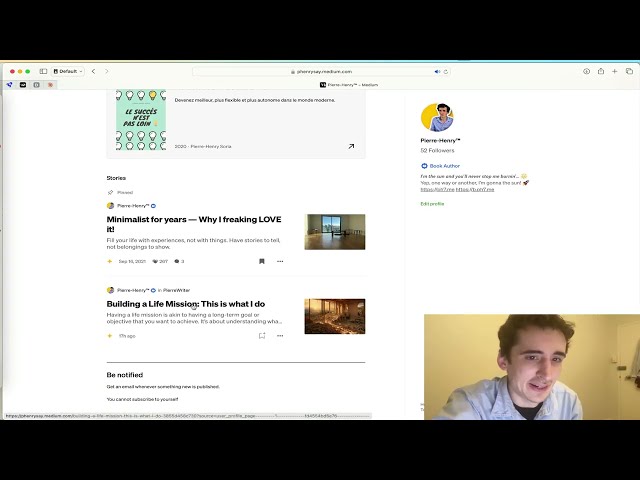

Pierre-Henry Soria. A super passionate engineer who loves automating efficiently content creation! 🚀 Enthusiast for YouTube, AI, learning, and writing of course! 😊 Find me at pH7.me 💫
☕️ Enjoying this project? Offer me a coffee (spoiler alert: I love almond flat white 😋)




Contributions to this project are welcome! Please fork the repository and submit a pull request with your changes.
Please keep in mind that this Videos to (Medium) Posts Converter project is for educational purposes only. Ensure you always comply with YouTube's terms of service and Medium's API usage guidelines and policy when using this script.
YouTube to Medium Automation script is generously distributed under the MIT License 🎉 Enjoy!